Bambu AMS
Filament cannot retract
Use the error message and a simple path test to locate the blockage before opening any assembly.
Error message
What the printer may show
The wording and HMS code depend on which sensor still detects filament and which AMS slot is active.
Common messages and codes
Failed to pull back the filament to the AMS: the filament left one detected position but did not complete the return path.
HMS_0700_2000_0002_0004: Bambu identifies possible broken filament in the toolhead for the stated AMS slot.
HMS_0700_4000_0002_0004: Bambu identifies an abnormal filament-buffer signal; a stuck spring or tangled filament may be involved.
Read the complete code shown on your printer. Slot and sensor-specific variants are not interchangeable.
Step 11. Check the toolhead path
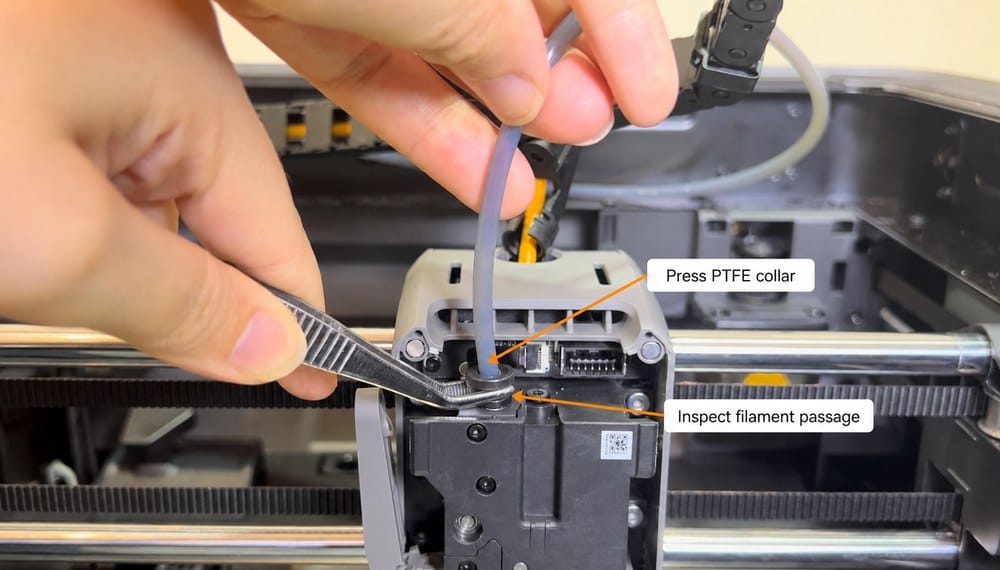
Release the PTFE tube at the toolhead and inspect the short passage into the extruder for a snapped or swollen piece of filament.
- Stop repeated retries before opening the toolhead if the feeder clicks or the filament stays under tension.
- Power off before removing the front cover or disconnecting the toolhead PTFE tube.
- After clearing the passage, push the tube fully back into the collar before retrying Unload.
Step 22. Check the rear PTFE path
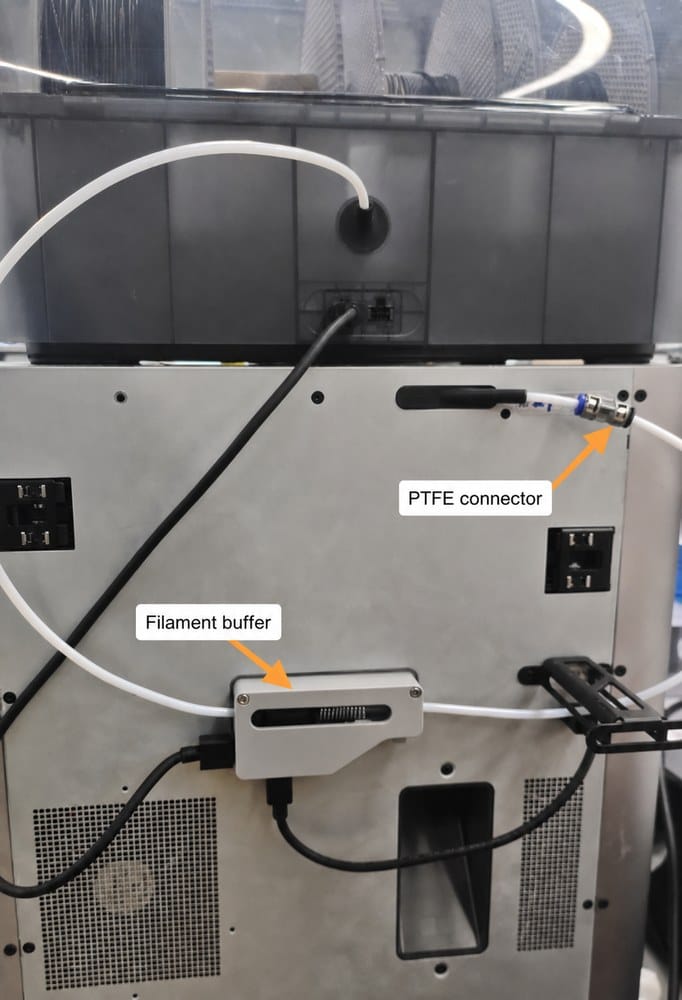
Test the tube between the toolhead, rear connector and filament buffer. Filament should slide through without catching and the buffer spring should move freely.
- Disconnect one PTFE joint at a time so the blocked section can be identified without losing the original routing.
- Pass a straight piece of filament through the released tube by hand; replace a crushed or deeply scored tube.
- Reconnect every tube fully and keep the bends broad, especially above and behind the printer.
Step 33. Check the AMS internal hub
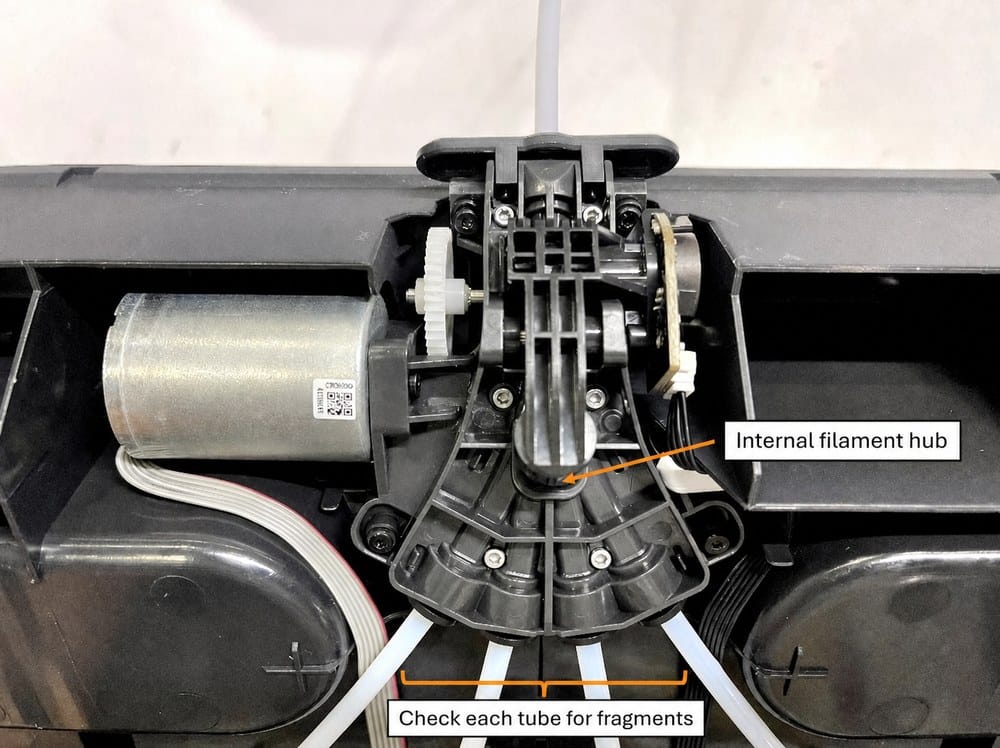
If the external path is clear, inspect the selected slot's internal PTFE tube and the central hub where all four tubes meet.
- Power off before lifting the AMS insert and do not pull it against the connected wiring.
- Check the selected slot tube first, then the central hub for a short broken fragment or filament dust.
- Reseat each internal PTFE tube completely before lowering the AMS insert back into place.
Step 44. Check the spool
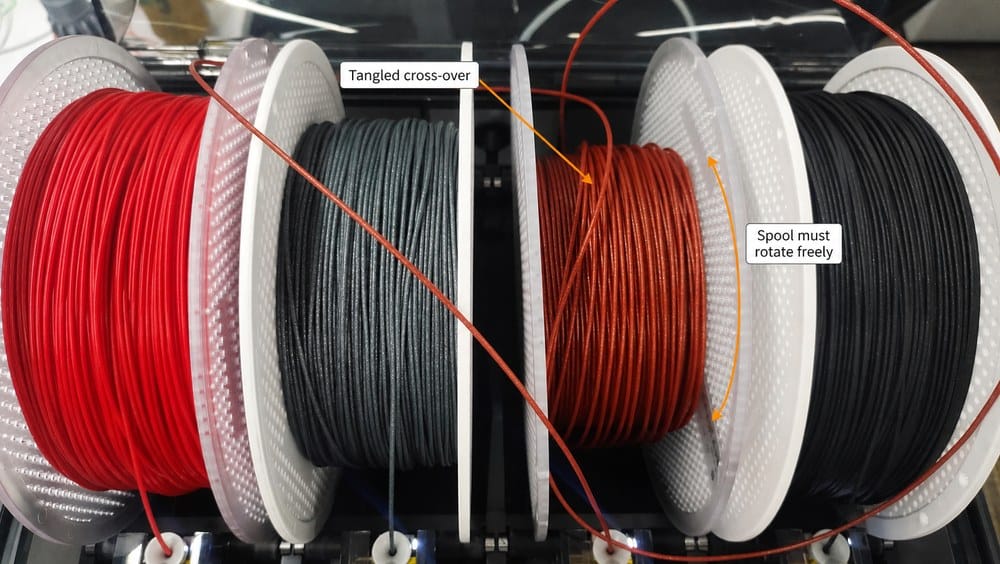
Remove any crossed filament winding and confirm the spool can rotate on both AMS rollers without rubbing the lid or divider.
- Keep control of the filament end and remove a cross-over without pulling against the feeder.
- Confirm both spool rims sit on the AMS rollers and the spool does not touch the lid or divider.
- Retry Unload only after the spool turns freely and the filament winding is tidy.
Area 1
Toolhead and extruder
Use this branch when filament will not leave the extruder or the toolhead sensor still reports filament.
Clear the toolhead path
Heat only when the normal unload action requires it; keep hands away from the hotend and moving parts.
If automatic unload fails, power off before removing the front cover or disconnecting the toolhead PTFE tube.
Check for a broken piece above the extruder, an incomplete cutter action or an extruder clog. Remove loose material without forcing it deeper.
After clearing, reconnect the PTFE tube and confirm the toolhead filament indicator changes when a short piece is inserted and removed.
Area 2
PTFE, rear hub and buffer
Use this branch when filament leaves the toolhead but stalls before reaching the AMS.
Test the external path
Straighten sharp PTFE bends, especially above the toolhead and behind the printer.
Release the tube at the nearest connector and slide a straight piece of filament through it by hand.
Remove any short broken fragment. Replace PTFE that is crushed, deeply scored or too tight at a connector.
Check that the rear buffer spring moves freely and that every tube is pushed fully back into its fitting.
Area 3
Selected AMS slot and internal hub
Use this branch when the external tube is clear but the slot cannot rewind filament into the AMS.
Check inside the AMS
Confirm the spool is not tangled, wedged against the lid or slipping off its rollers.
Power off before lifting the AMS insert. Keep track of cables and do not pull the insert against connected wiring.
Inspect the selected feeder tube and internal hub for a snapped piece or filament dust; clear the path and reseat the internal PTFE tubes.
If the feeder sensor remains active with no filament, or the motor does not move after the path is clear, clean the sensor area and contact Bambu Support if the fault remains.
Restart
Reconnect and test
Reassemble the complete filament path before applying power.
Final check
All PTFE tubes are fully seated and cannot be pulled out without pressing the collar.
The spool turns freely and the loose end is not trapped under another winding.
Run Load, then Unload, using the affected slot while watching each section of the path.
Stop and open a support ticket if clicking, sensor errors or motor failure continue after the path is clear.
Sources
References
The diagnostic order and service limits are based on Bambu Lab's AMS and X1 troubleshooting documentation.