School Projects in 3D Printing and Electronics
By Fix It Today, 27/09/2026 · 2 min read

Fix It Today works with schools on 3D modelling, 3D printing and electronics projects. Students design a part, build a circuit or program an interaction, then test what they have made.
Nanyang Girls’ High School
Our programme with Nanyang Girls’ High School included Arduino programming, electronic components, 3D printed parts and the design of interactive games and clues. Students developed their ideas, tested the interactions and prepared instructions and presentation materials.
The project work connects design decisions with practical testing. A circuit needs to respond correctly, and the instructions need to help another person use it.
MIC project
This interactive board is from our MIC work. It brings together a display, sensors and illuminated components in a physical project.
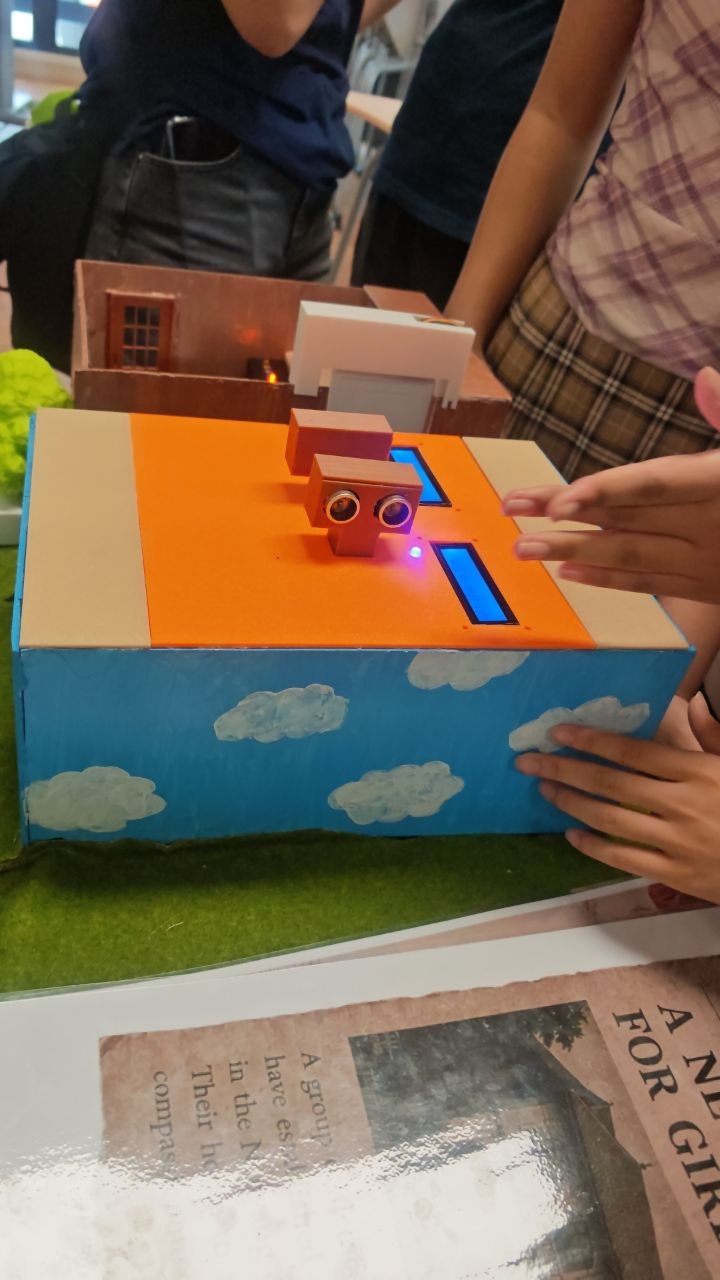
An interactive board from our MIC work.
How an interactive project works
A useful starting point is input, process and output. A button or distance sensor supplies an input. The code checks that input against a rule. A screen, light, sound or motor then gives a response. Students can test each part separately before connecting the whole system.
3D printing helps with the physical design. A display may need a mount, a game may need a token, or a circuit may need a case. Students measure the parts, allow space for them to fit and test a printed prototype before making changes.
Printed parts and game pieces from our workshop development.
Programmes for schools
Our school work has also included planning for miniature escape room activities with Bartley Secondary School and 3D printing, 3D pen and design thinking programmes with Boon Lay Garden Primary School.
A short workshop can focus on one object or circuit. A longer programme gives students time to develop an idea, build a prototype and improve it after testing. We plan the project around the students’ level, the school’s learning goals and the time available.
Plan a programme
Share the student level, group size, preferred dates, session length and budget. We can discuss the project, materials and teaching support, then prepare a quote.
Related articles

The Story of the 3D Printer: From RepRap to Bambu Lab
How the desktop 3D printer happened, in order: the patents, RepRap at the University of Bath, MakerBot, the Prusa i3, Creality's Ender-3, Prusa Research and Bambu Lab, with photographs of each machine.

Building More With Tinkercad: A Storage Box With a Lid
A more advanced Tinkercad project than a keychain: a hollow storage box and a separate lid, built with a Hole shape, Align on all three axes, a Union group and a raised label. Part 4 of the series.

The Tinkercad Toolbox: Every Tool, What It Does
Every Tinkercad tool explained: the full shape library, Align, Mirror, Group and Ungroup, the Workplane tool, Colour, Snap Grid, and Import and Export. Part 3 of the series.