Design-thinking class: improve, make and test
By Fix It Today, 8 October 2026
Start with a person and a difficulty. Compare two ideas, choose one useful change, draw the parts and plan a fair test. These are design proposals: the drawings and descriptions do not prove that the equipment works.
Use group numbers only. Share your drawing and explanation with your teacher; keep names, logins and private classroom links out of public work.
Group 1
Open Group 1 activities and answers
Idea 1: Foldable tray
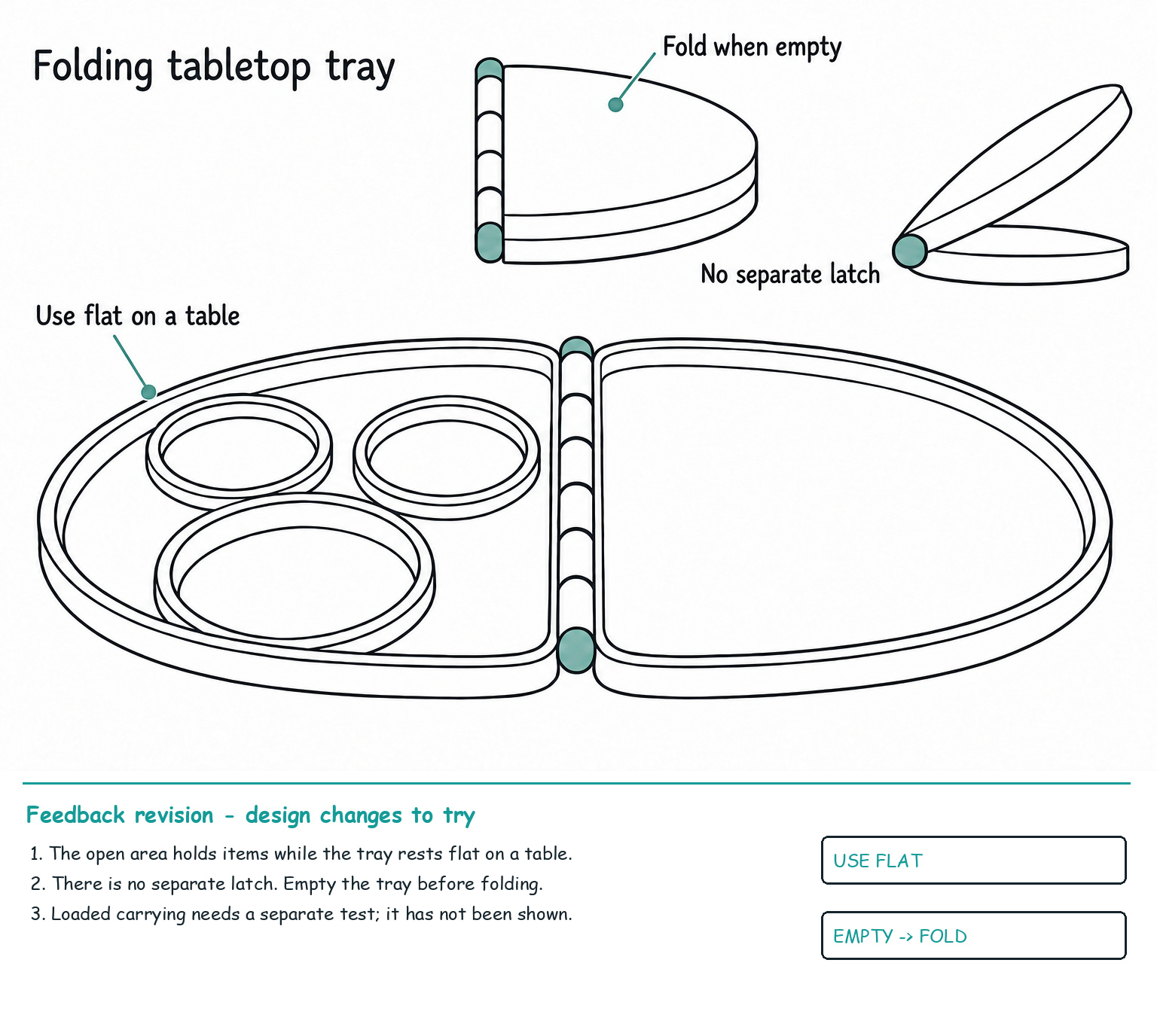
Who it could help: People using a tray
The problem
A tray needs the right support for carrying or table use.
Why it matters
Folding could save storage space, if the tray still does its main job well.
The idea
A tray that rests on a table and folds away when empty.
How it works
- Open the tray flat on a table.
- Put items in the three round spaces.
- Empty the tray before folding it.
What to find out
Will it be carried or stay on a table?
Check table support, hinge gaps and empty folding.
Feedback revision
- The open area holds items while the tray rests flat on a table.
- There is no separate latch. Empty the tray before folding.
- Loaded carrying needs a separate test; it has not been shown.
Idea 2: Mobile bin and companion
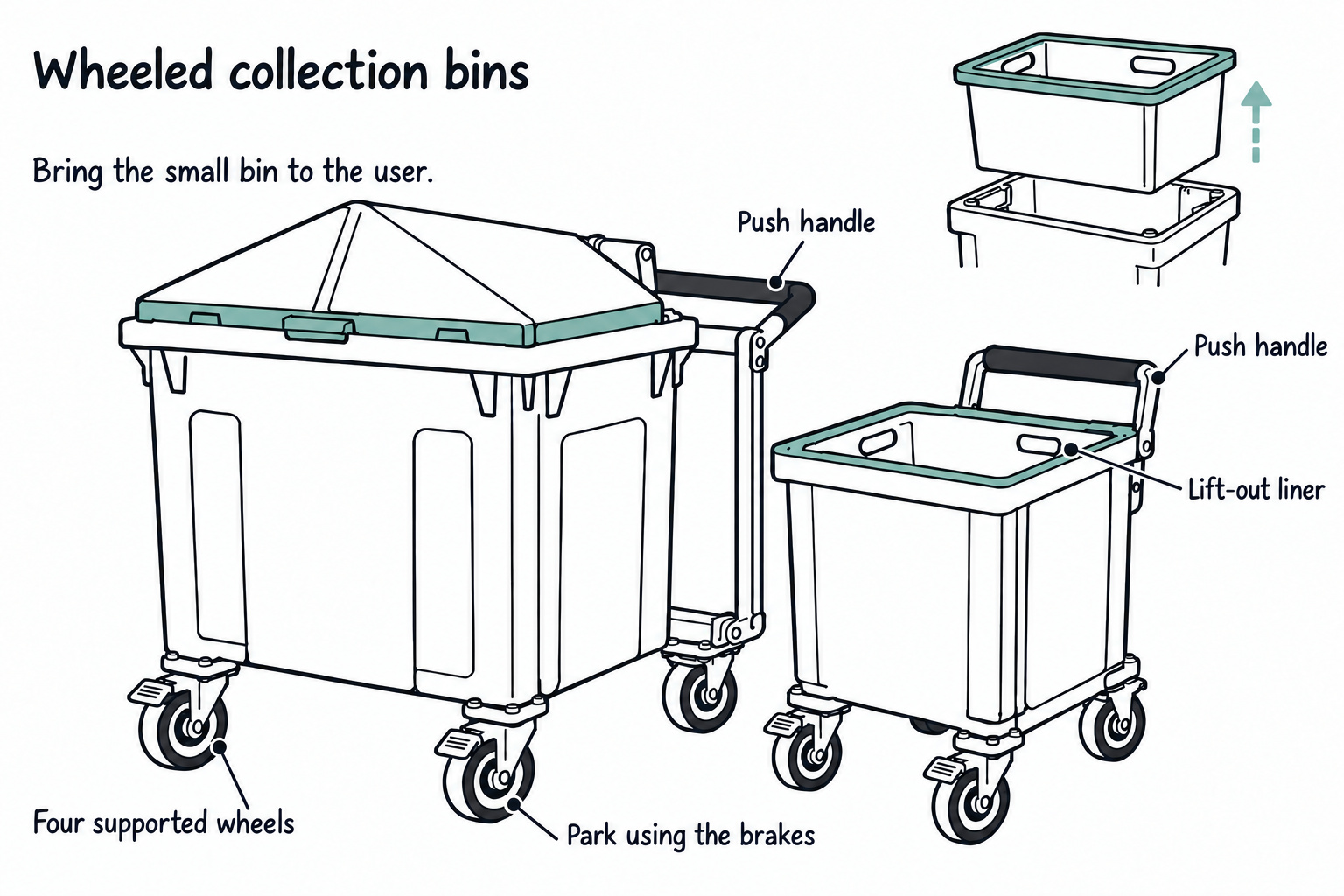
Who it could help: People collecting rubbish
The problem
Moving a full bin and emptying it can be difficult.
Why it matters
A movable bin should be easy to push, park and empty.
The idea
A large bin with a lid and a smaller open bin, each pushed by hand.
How it works
- Push each bin where it is needed.
- Use the brakes to park the large bin.
- Lift out the small bin's inner container.
What to find out
Where would the bins help, and how will people empty them?
Test pushing, brakes, handle reach and lifting out the container.
Your activities
Improve the problem
Name a person, one difficult step and the evidence we need.
- Read the problem statement and the suggested wording.
- Ask someone what they would carry in the tray and where they would put it away.
- Choose one difficult step. Complete your own improved statement.
Check: Name who needs help, what is difficult and what you still need to test.
Make the idea work
Show a useful change and explain how the parts connect.
- Show the tray open and folded.
- Draw where you would add faces to stop it opening too far.
- Decide whether it needs a latch and show how it would open.
Check: The drawing shows an input, movement or action, and a result. It distinguishes the printed structure from supplied equipment.
Test and explain
Compare fairly and explain what the result means.
- Use this comparison: An ordinary tray carrying the same light objects.
- Try opening, using and storing both trays five times. Keep the objects, route and storage place the same.
- Record what happened, or write the test plan if the equipment is not available. Explain one next change.
Check: Five opening and closing cycles without jamming, with the tray reaching a level stop each time; keep the fold only if storage improves without making use harder.
Group 2
Open Group 2 activities and answers
Idea 1: Mushroom nightlight
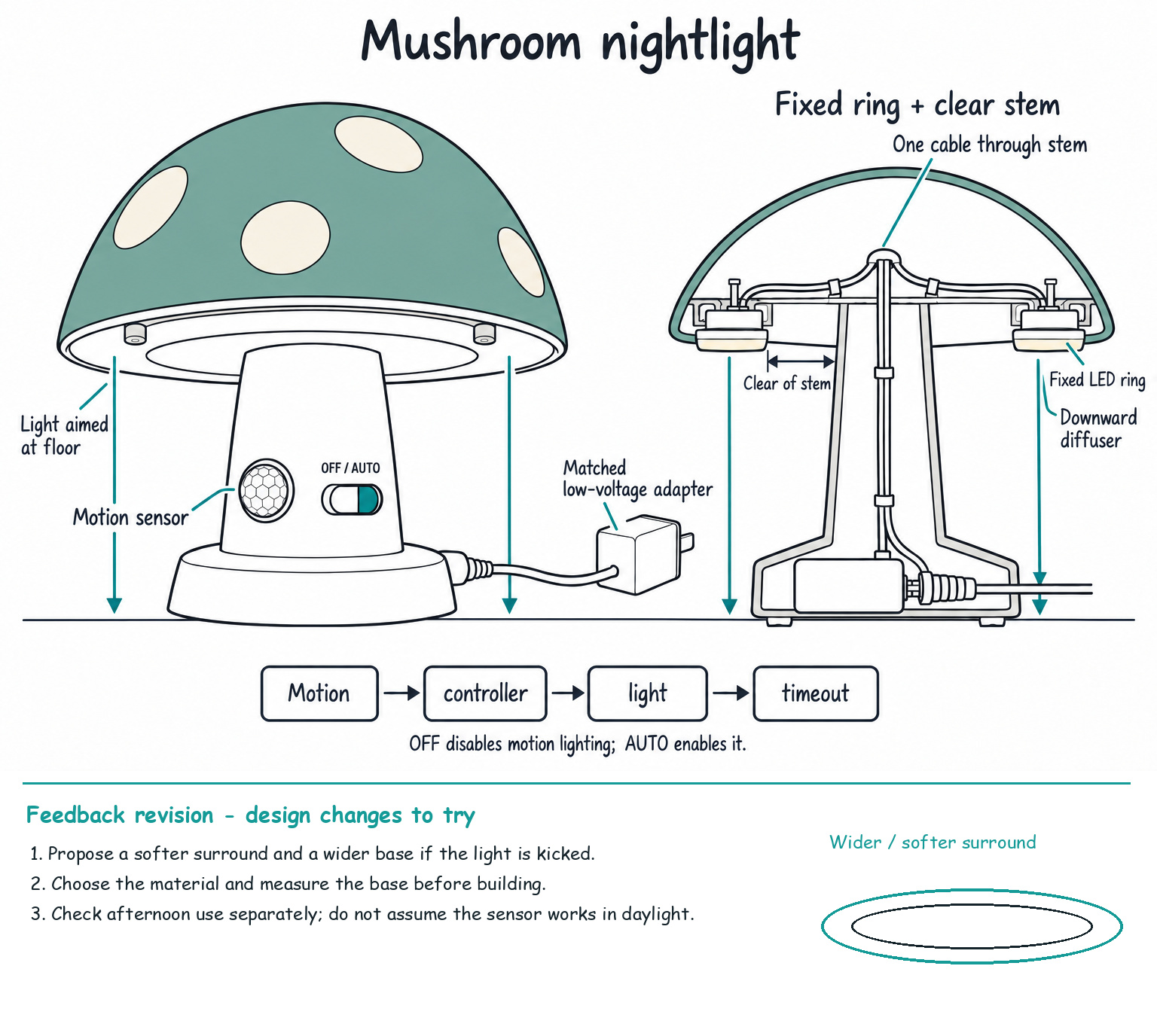
Who it could help: An older person getting out of bed
The problem
An older person getting out of bed needs to see the nearby floor.
Why it matters
The light should reach the floor and feel comfortable on the eyes.
The idea
A mushroom-shaped lamp that senses movement and shines down towards the floor.
How it works
- Set the switch to AUTO.
- Movement turns on the downward light.
- The light turns off after a pause.
What to find out
Does the light reach the floor without glare?
Check floor light, glare, timeout and stability beside a bed.
Feedback revision
- Propose a softer surround and a wider base if the light is kicked.
- Choose the material and measure the base before building.
- Check afternoon use separately; do not assume the sensor works in daylight.
Idea 2: Robot sorting bin
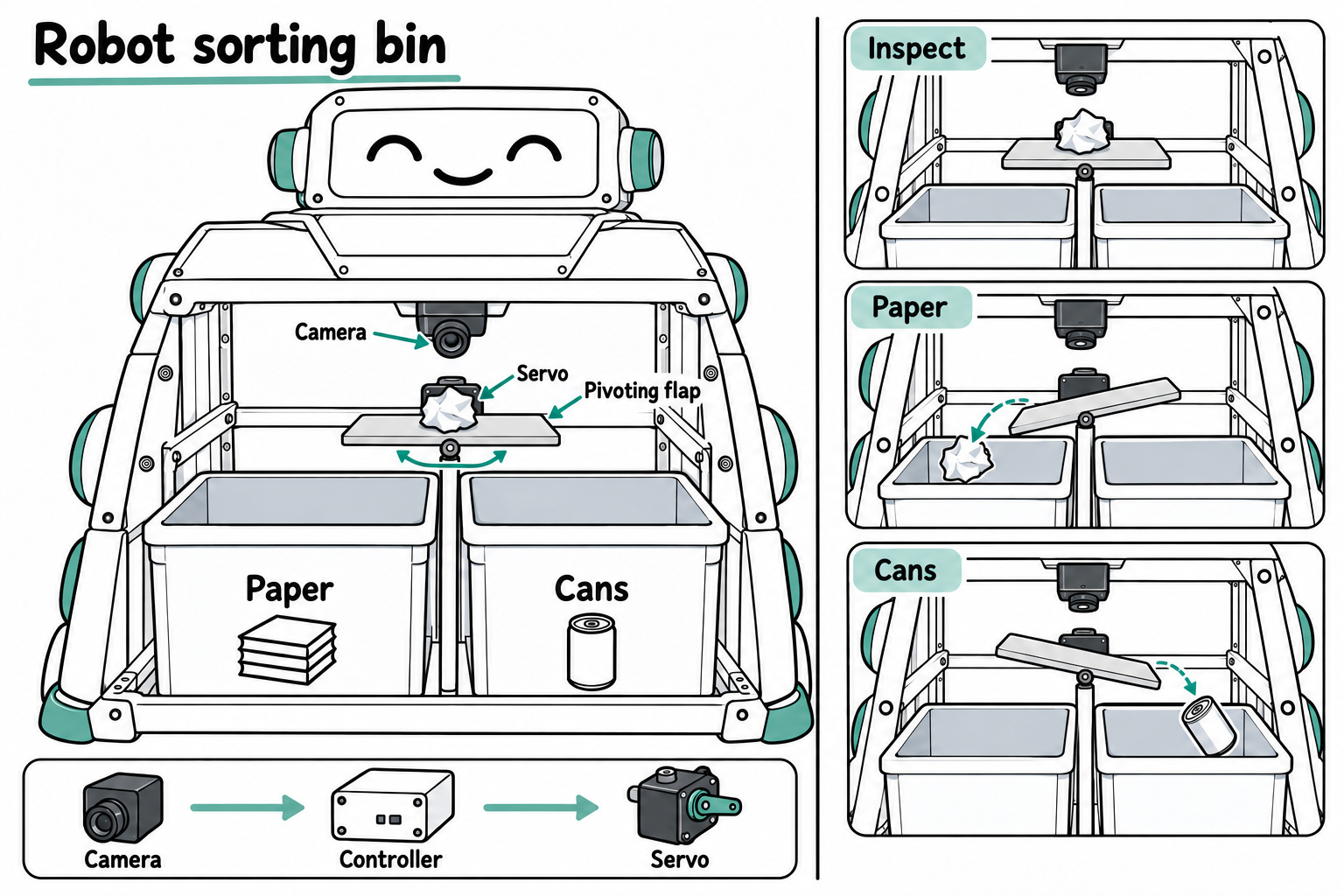
Who it could help: People sorting rubbish
The problem
People sometimes put rubbish into the wrong compartment.
Why it matters
The item needs a clear path into the chosen bin.
The idea
A robot bin that checks an item with a camera and uses a small flap to choose its route.
How it works
- The camera checks one item.
- The controller chooses a bin.
- The flap tilts to that bin.
What to find out
Which items can the camera recognise? What happens when it is unsure?
Try known and unknown items; check flap movement and jams.
Your activities
Improve the problem
Name a person, one difficult step and the evidence we need.
- Read the problem statement and the suggested wording.
- Ask which step is difficult at the actual bedside: seeing the floor, reaching a control or avoiding glare.
- Choose one difficult step. Complete your own improved statement.
Check: Name who needs help, what is difficult and what you still need to test.
Make the idea work
Show a useful change and explain how the parts connect.
- Mark the sensor facing the person and keep it uncovered.
- Draw the light path towards the floor and the rear cable route.
- Label ON/OFF and the separate bought adapter.
Check: The drawing shows an input, movement or action, and a result. It distinguishes the printed structure from supplied equipment.
Test and explain
Compare fairly and explain what the result means.
- Use this comparison: The same light at the same position without the added cap lip; include an existing nightlight if available.
- Compare the two versions from a safe seated position. Try five movements in front of the stationary lamp and check OFF.
- Record what happened, or write the test plan if the equipment is not available. Explain one next change.
Check: Keep the lip only if the floor stays visible, glare improves for the observer and sensing is no worse. OFF must remain off during movement.
Group 3
Open Group 3 activities and answers
Idea 1: Sound and hello companion
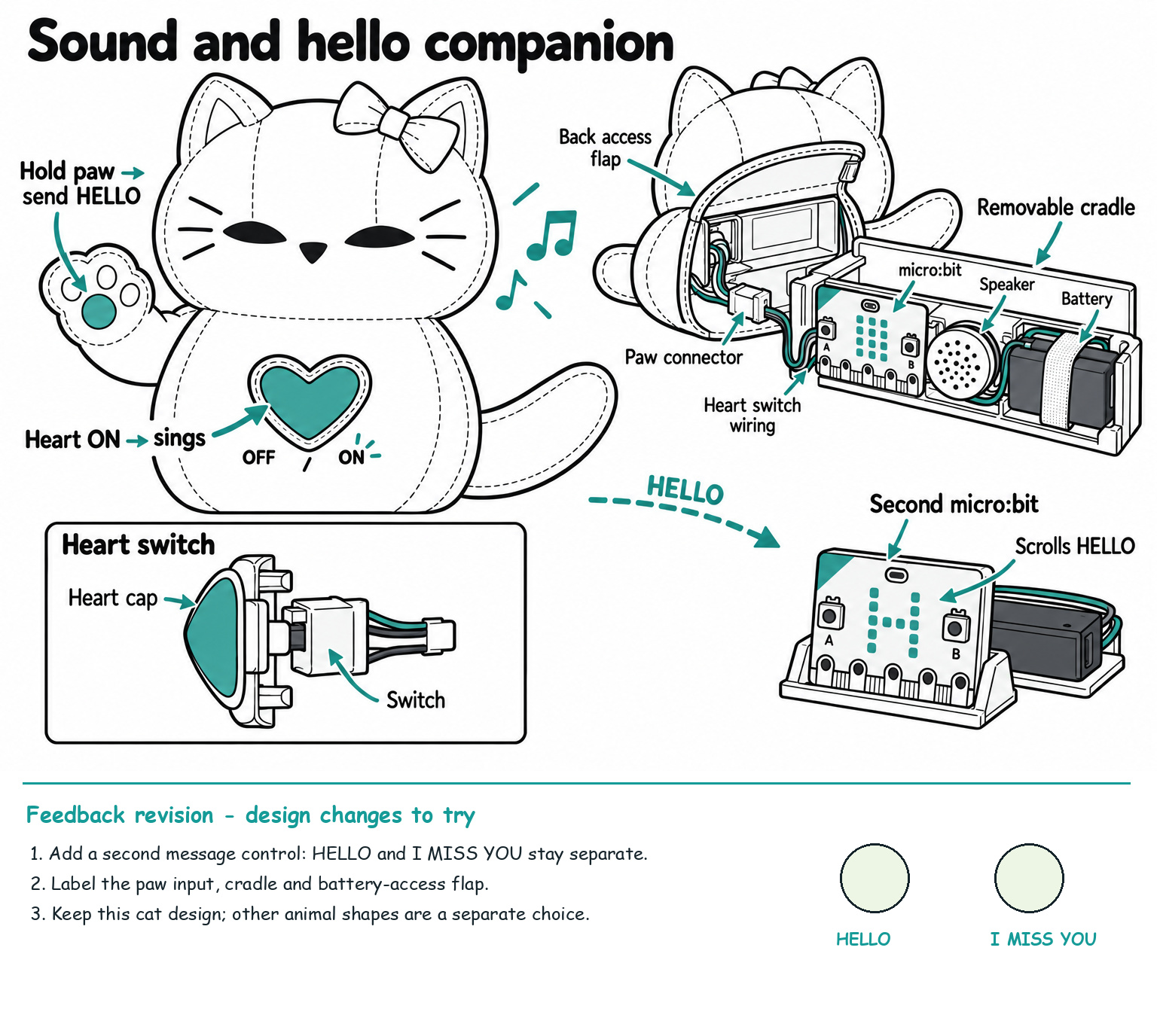
Who it could help: A person living alone
The problem
A person living alone wants comfort and an easy way to send a greeting.
Why it matters
The song offers comfort, and the paw gives a simple way to send a greeting.
The idea
A singing plush with a heart switch and a paw that sends HELLO to a second micro:bit.
How it works
- Switch the heart on to start the song.
- Hold the paw to send HELLO.
- The second micro:bit scrolls HELLO.
What to find out
Can the other micro:bit receive HELLO from the needed distance?
Test the heart switch, song, paw press and radio range.
Feedback revision
- Add a second message control: HELLO and I MISS YOU stay separate.
- Label the paw input, cradle and battery-access flap.
- Keep this cat design; other animal shapes are a separate choice.
Idea 2: Private parcel box
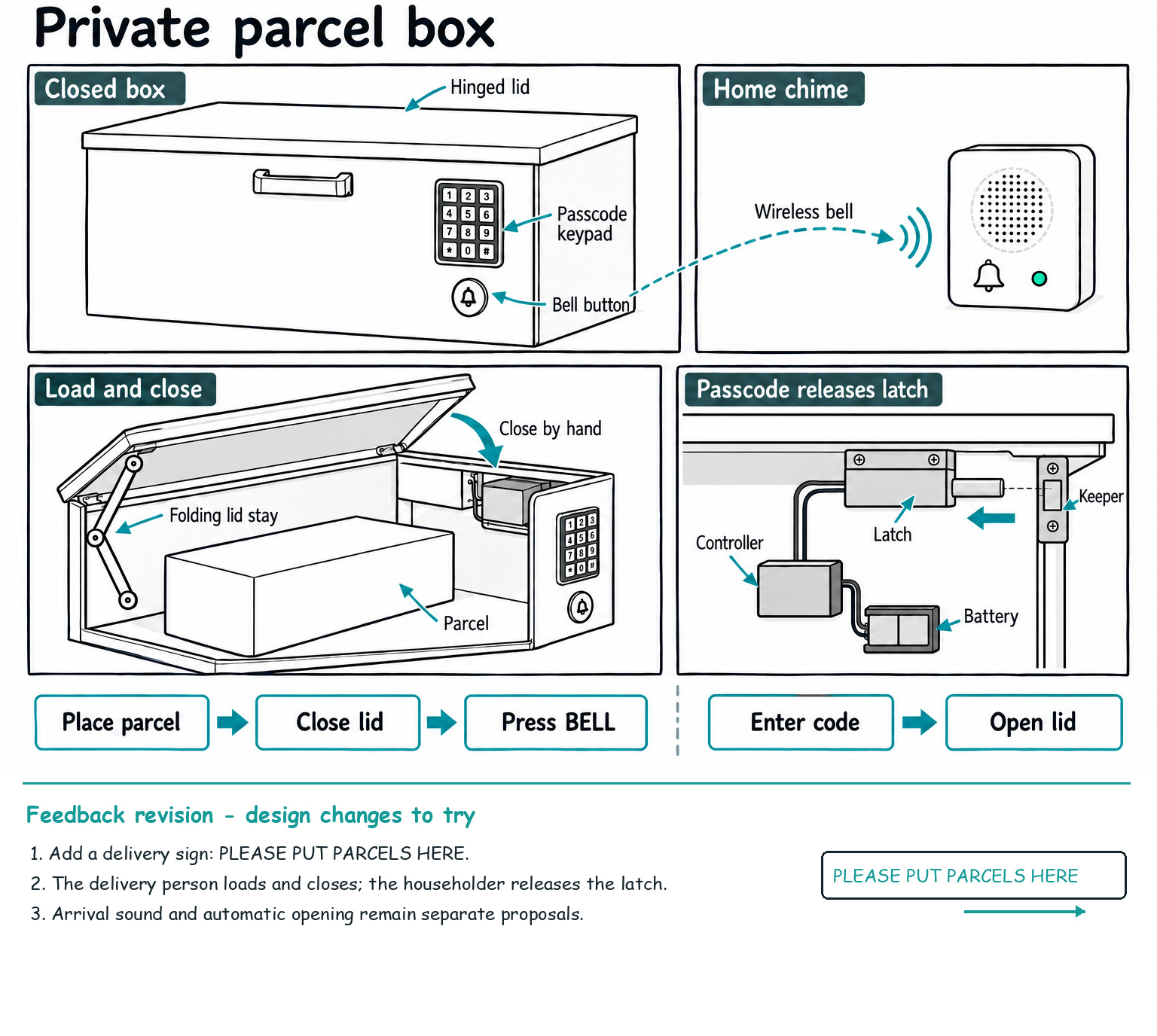
Who it could help: An older resident receiving parcels
The problem
A parcel left outside a door can be seen and reached by other people.
Why it matters
Keeping parcels out of sight could give the owner more privacy.
The idea
An opaque parcel box with a passcode lock and a bell that sends an alert indoors.
How it works
- Place the parcel in the open box.
- Close the lid by hand.
- Press the bell to alert someone indoors.
- Enter the passcode to open the latch.
What to find out
How can another parcel arrive after the lid is locked?
Test the code, lid, latch, bell and indoor alert.
Feedback revision
- Add a delivery sign: PLEASE PUT PARCELS HERE.
- The delivery person loads and closes; the householder releases the latch.
- Arrival sound and automatic opening remain separate proposals.
Your activities
Improve the problem
Name a person, one difficult step and the evidence we need.
- Read the problem statement and the suggested wording.
- Ask a willing person what sound they would enjoy and how they would expect to stop it.
- Choose one difficult step. Complete your own improved statement.
Check: Name who needs help, what is difficult and what you still need to test.
Make the idea work
Show a useful change and explain how the parts connect.
- Show the soft outside and the removable cradle inside.
- Trace heart press to sound and paw press to the nearby receiver.
- Label how to stop the sound.
Check: The drawing shows an input, movement or action, and a result. It distinguishes the printed structure from supplied equipment.
Test and explain
Compare fairly and explain what the result means.
- Use this comparison: A simple sound button with the same tune, and an ordinary hello message.
- Ask a willing person to start and stop the sound without hints. Send five nearby hello messages and count acknowledgements.
- Record what happened, or write the test plan if the equipment is not available. Explain one next change.
Check: The person can start and stop the sound and explain the paw action; record all five hello attempts, including any missed messages.
Group 4
Open Group 4 activities and answers
Idea 1: Rainwater plant pot
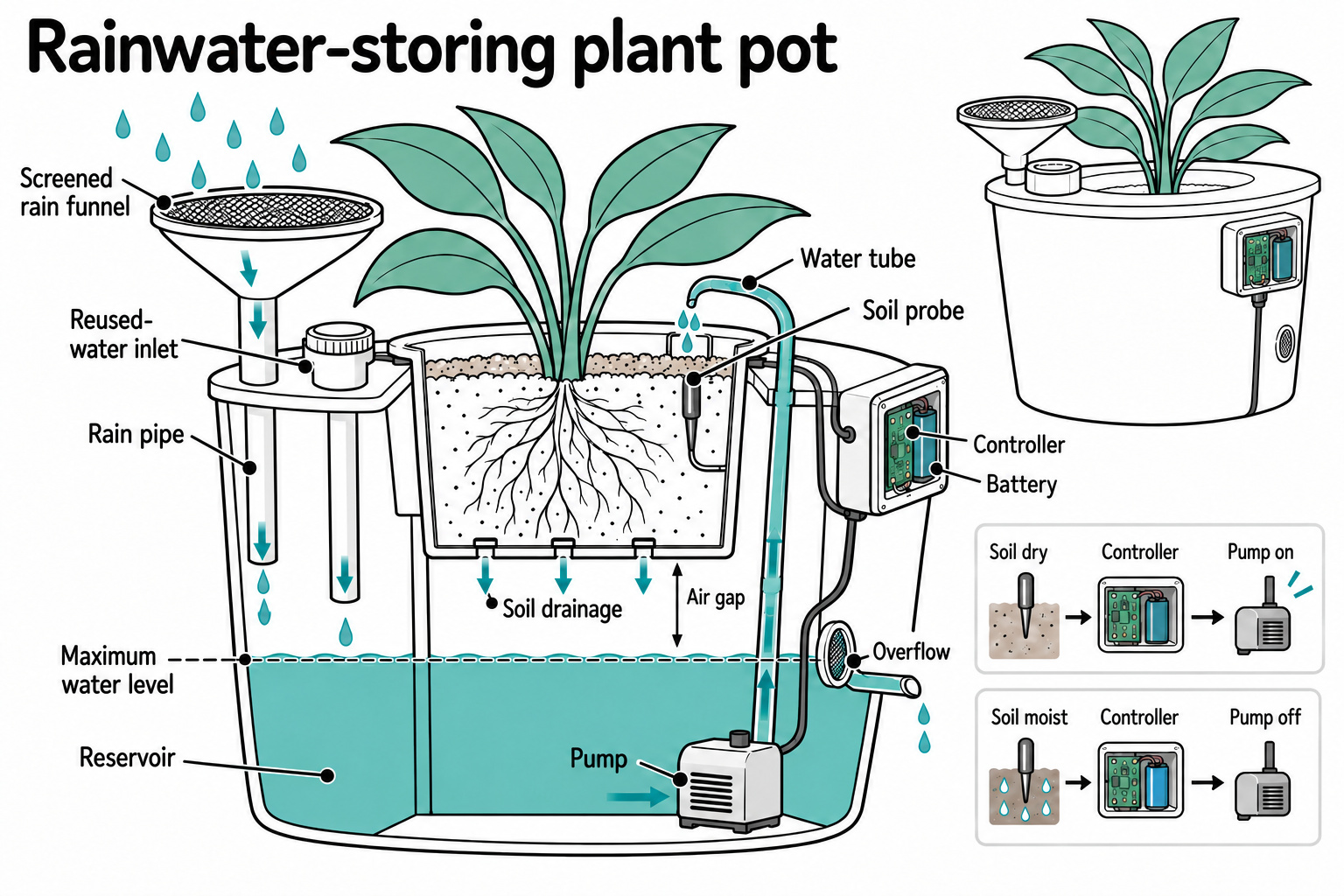
Who it could help: A busy person caring for plants
The problem
Plants need water when their soil becomes dry.
Why it matters
Stored rainwater and suitable reused water could reduce waste.
The idea
A pot that collects water and uses a soil probe and pump to water the plant when needed.
How it works
- Collect rain and suitable reused water.
- The probe checks the soil.
- Dry soil switches the pump on.
- Moist soil switches it off.
What to find out
Is the water suitable, and is the soil setting right?
Check water flow, drainage, overflow and an empty tank.
Idea 2: Doorbell wristband
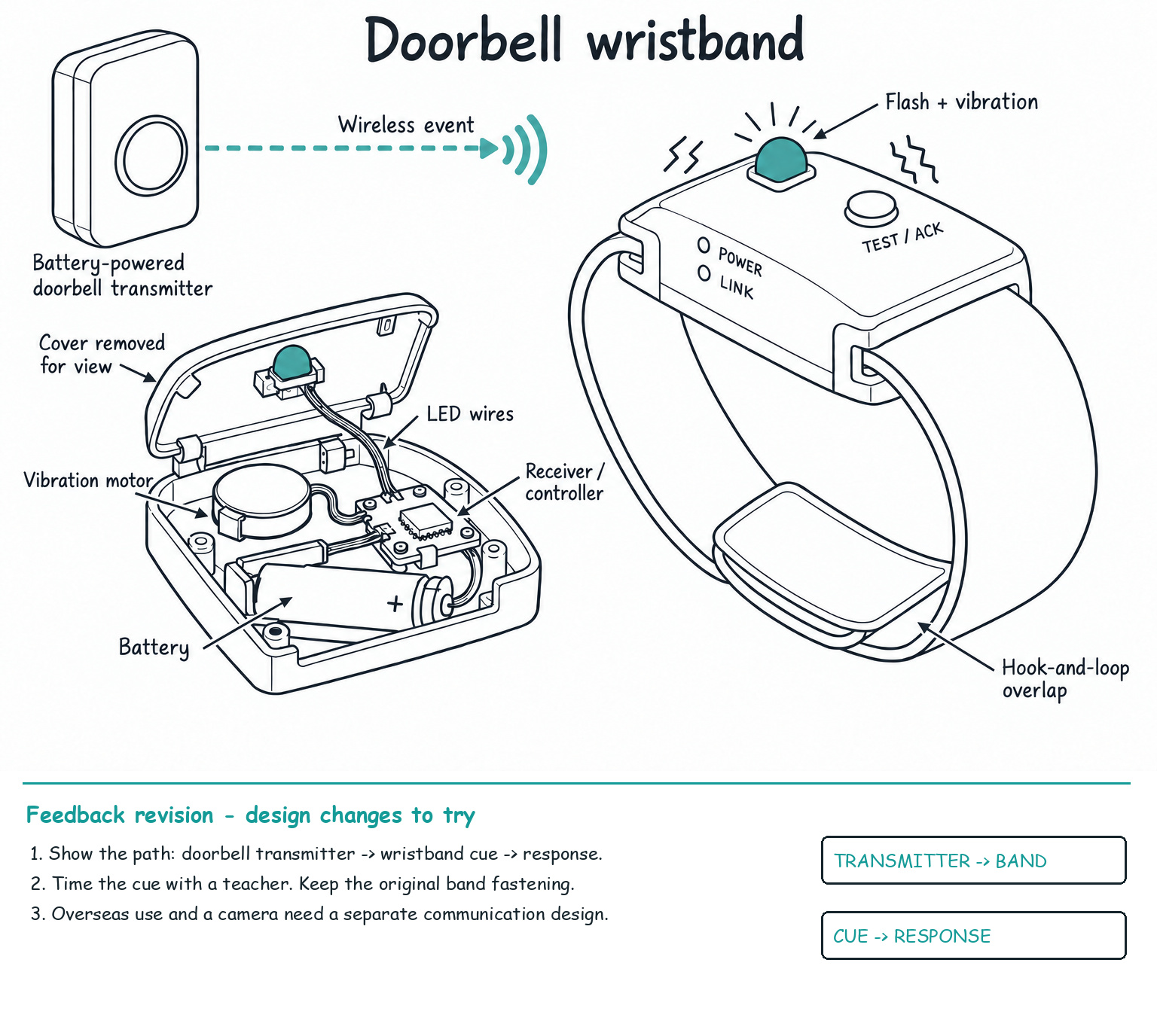
Who it could help: Someone who may not hear the doorbell
The problem
A person with hearing difficulties may miss someone ringing the doorbell.
Why it matters
Flashing lights and vibration could help the wearer notice a visitor.
The idea
A wristband that flashes and vibrates when someone rings the doorbell.
How it works
- Someone presses the doorbell.
- The band receives the signal.
- The band flashes and vibrates.
What to find out
Can the wearer feel the vibration and see the light?
Test comfort, range, missed alerts and battery life.
Feedback revision
- Show the path: doorbell transmitter -> wristband cue -> response.
- Time the cue with a teacher. Keep the original band fastening.
- Overseas use and a camera need a separate communication design.
Your activities
Improve the problem
Name a person, one difficult step and the evidence we need.
- Read the problem statement and the suggested wording.
- Ask what actually goes wrong when watering is missed, and whether checking or refilling an existing reservoir is difficult.
- Choose one difficult step. Complete your own improved statement.
Check: Name who needs help, what is difficult and what you still need to test.
Make the idea work
Show a useful change and explain how the parts connect.
- Trace one unbroken wick from below the water surface into the soil.
- Show a gap between stored water and the pot floor.
- Show the guide moving sideways without pulling out the buried wick.
Check: The drawing shows an input, movement or action, and a result. It distinguishes the printed structure from supplied equipment.
Test and explain
Compare fairly and explain what the result means.
- Use this comparison: A plain wick reservoir with the same container, wick and planting medium.
- For class, demonstrate the path and compare access to the wick. Plan a longer water-delivery comparison with equal starting water and conditions.
- Record what happened, or write the test plan if the equipment is not available. Explain one next change.
Check: Keep the guide only if inspection is easier and the wick remains connected. The longer trial must show suitable delivery for the chosen pot without overflow.
Group 5
Open Group 5 activities and answers
Idea 1: Parcel arrival notice
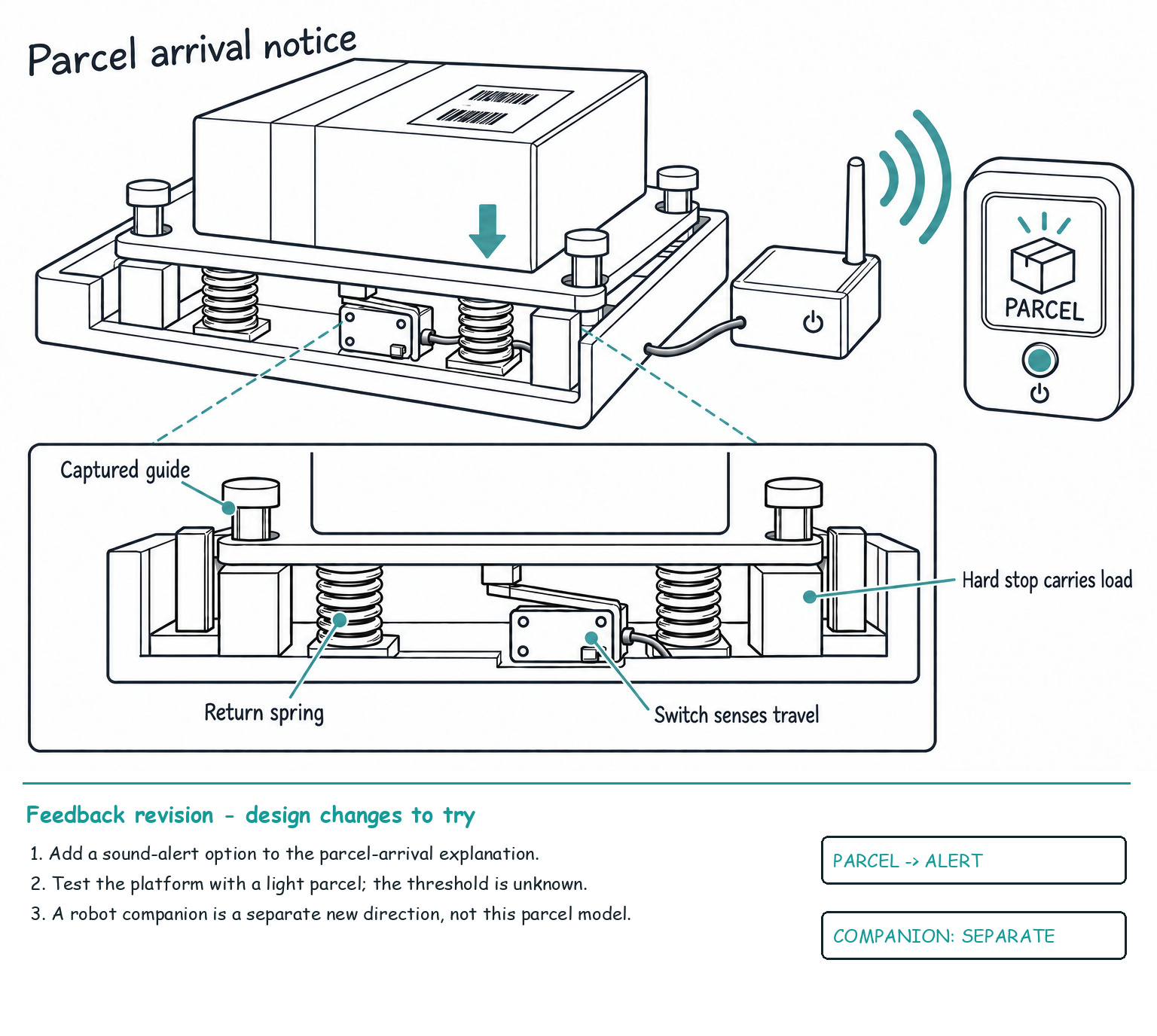
Who it could help: A resident waiting for a delivery
The problem
A resident may not notice that a parcel has arrived at the door.
Why it matters
An indoor notice could help the resident know when to check for a parcel.
The idea
A platform that sends a notice indoors when a parcel is placed on it.
How it works
- The parcel pushes the platform down.
- A switch sends a message indoors.
- Springs lift the empty platform again.
What to find out
Does it notice light or off-centre parcels?
Try different model loads and repeat deliveries.
Feedback revision
- Add a sound-alert option to the parcel-arrival explanation.
- Test the platform with a light parcel; the threshold is unknown.
- A robot companion is a separate new direction, not this parcel model.
Idea 2: Crossing reminder cuff
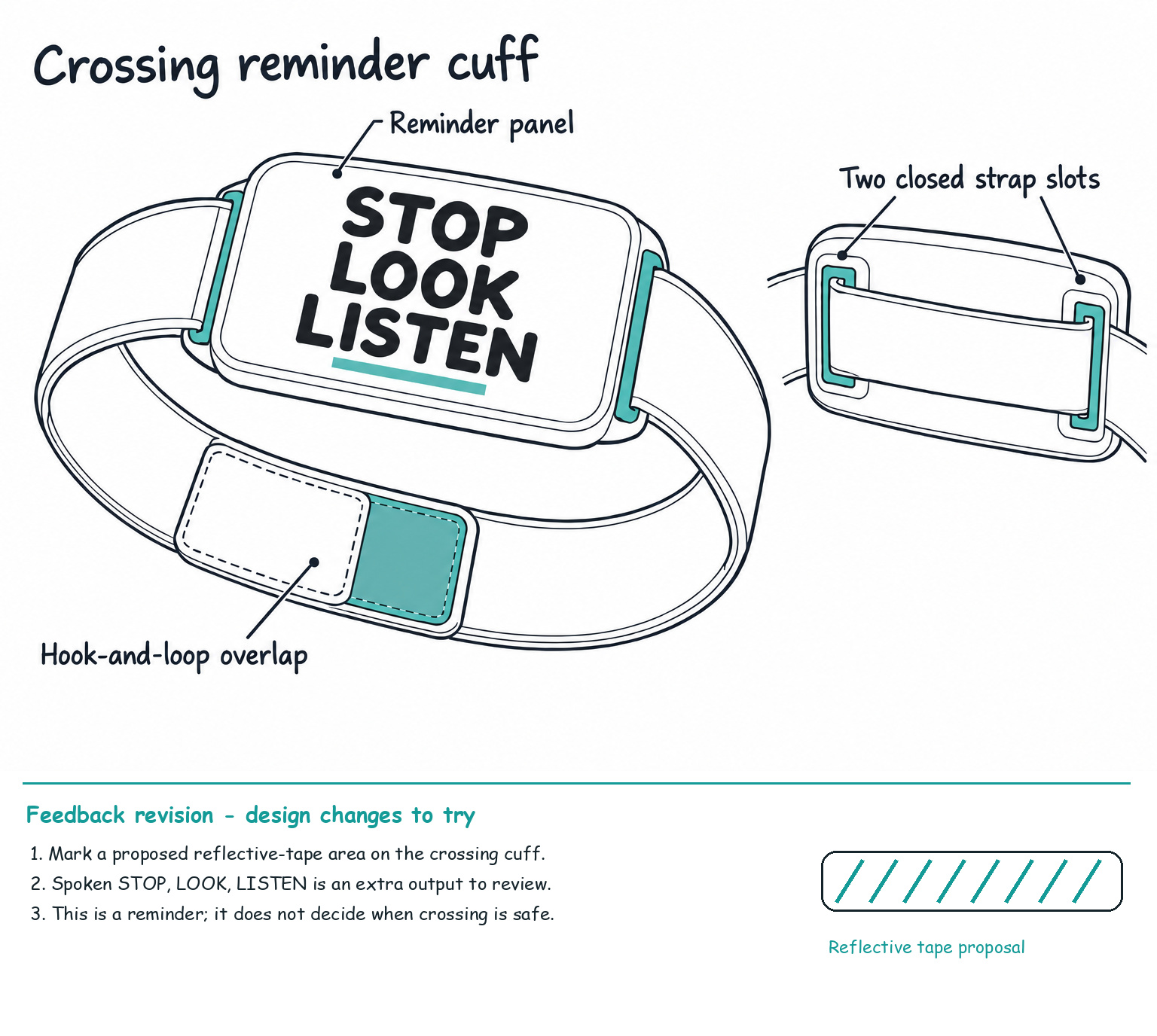
Who it could help: A person approaching a road crossing
The problem
A person approaching a crossing may need a reminder to stop, look and listen.
Why it matters
The reminder needs to be easy to read and comfortable enough to wear.
The idea
An adjustable wrist cuff with a STOP LOOK LISTEN reminder.
How it works
- Thread the strap through both slots.
- Wrap it around the wrist and fasten it.
- Read STOP LOOK LISTEN before crossing.
What to find out
Would people wear it and read the reminder?
Compare comfort and reading with a simple reminder card.
Feedback revision
- Mark a proposed reflective-tape area on the crossing cuff.
- Spoken STOP, LOOK, LISTEN is an extra output to review.
- This is a reminder; it does not decide when crossing is safe.
Your activities
Improve the problem
Name a person, one difficult step and the evidence we need.
- Read the problem statement and the suggested wording.
- Ask a recipient to describe a missed parcel notice and the method they use now.
- Choose one difficult step. Complete your own improved statement.
Check: Name who needs help, what is difficult and what you still need to test.
Make the idea work
Show a useful change and explain how the parts connect.
- Show the plate above the switch and the spring returning it.
- Draw a radio arrow to the separate receiver.
- Label who presses acknowledge and what that changes.
Check: The drawing shows an input, movement or action, and a result. It distinguishes the printed structure from supplied equipment.
Test and explain
Compare fairly and explain what the result means.
- Use this comparison: An ordinary knock or message in the same pretend delivery routine.
- Use five dummy deliveries. A tester at the receiver acknowledges each alert. Include a light parcel and a parcel left in place.
- Record what happened, or write the test plan if the equipment is not available. Explain one next change.
Check: Each agreed test parcel should produce one clear arrival event; acknowledgement clears the reminder, and removal lets the plate reset.
Group 6
Open Group 6 activities and answers
Idea 1: Fire inspection drone
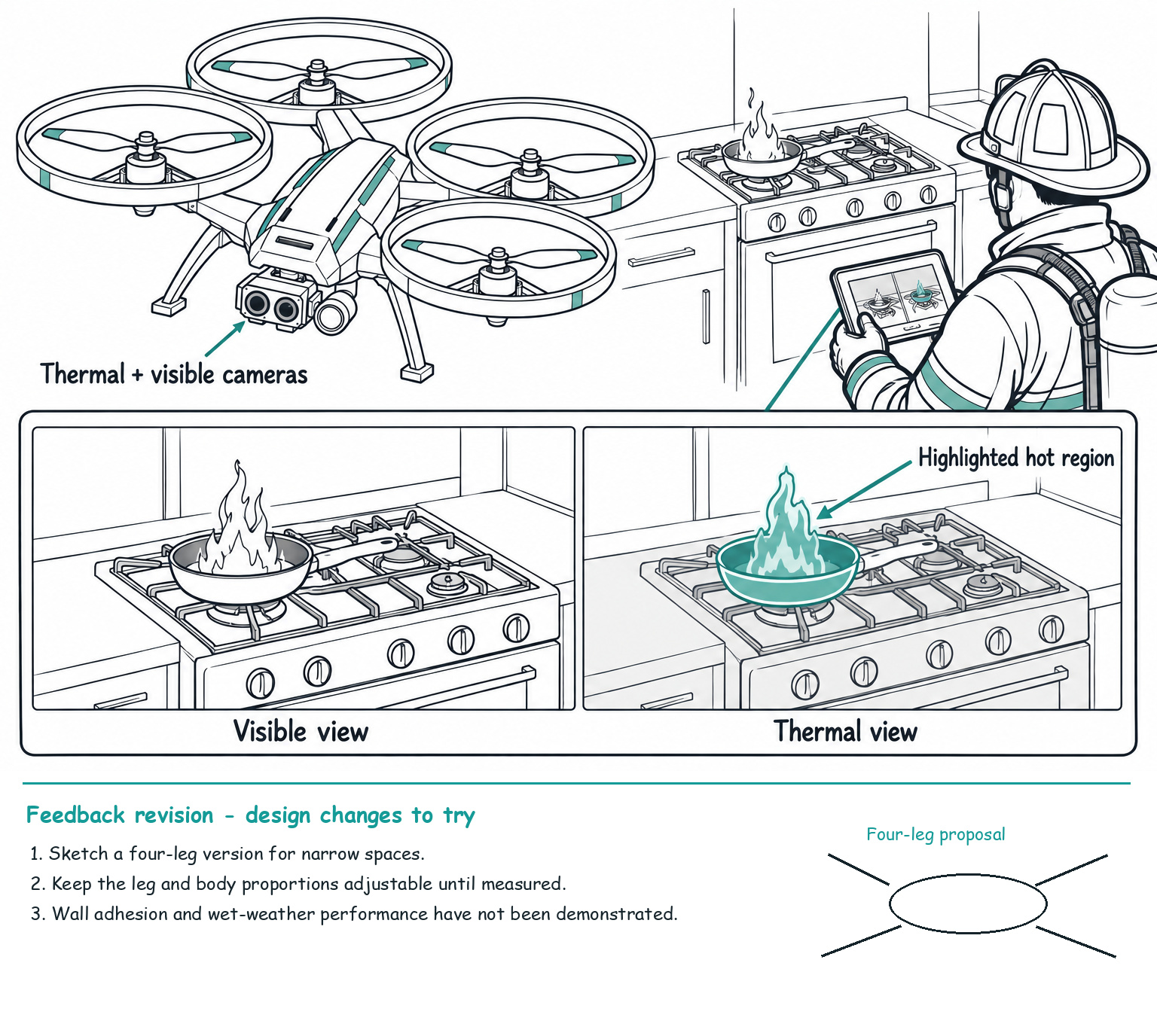
Who it could help: Firefighters
The problem
A response team needs to see what is happening in a place that is hard to reach.
Why it matters
Seeing heat beside a normal picture can help a firefighter find the hot area.
The idea
A drone with normal and thermal cameras that shows a visible fire and highlights its hot region.
How it works
- The drone sends normal and heat pictures.
- Compare both views of the visible fire.
- The highlight helps the firefighter spot the hot area.
What to find out
Do the normal and heat views show the same area?
Use safe pictures to compare heat views and camera errors.
Feedback revision
- Sketch a four-leg version for narrow spaces.
- Keep the leg and body proportions adjustable until measured.
- Wall adhesion and wet-weather performance have not been demonstrated.
Idea 2: Stove fire detector and nozzle
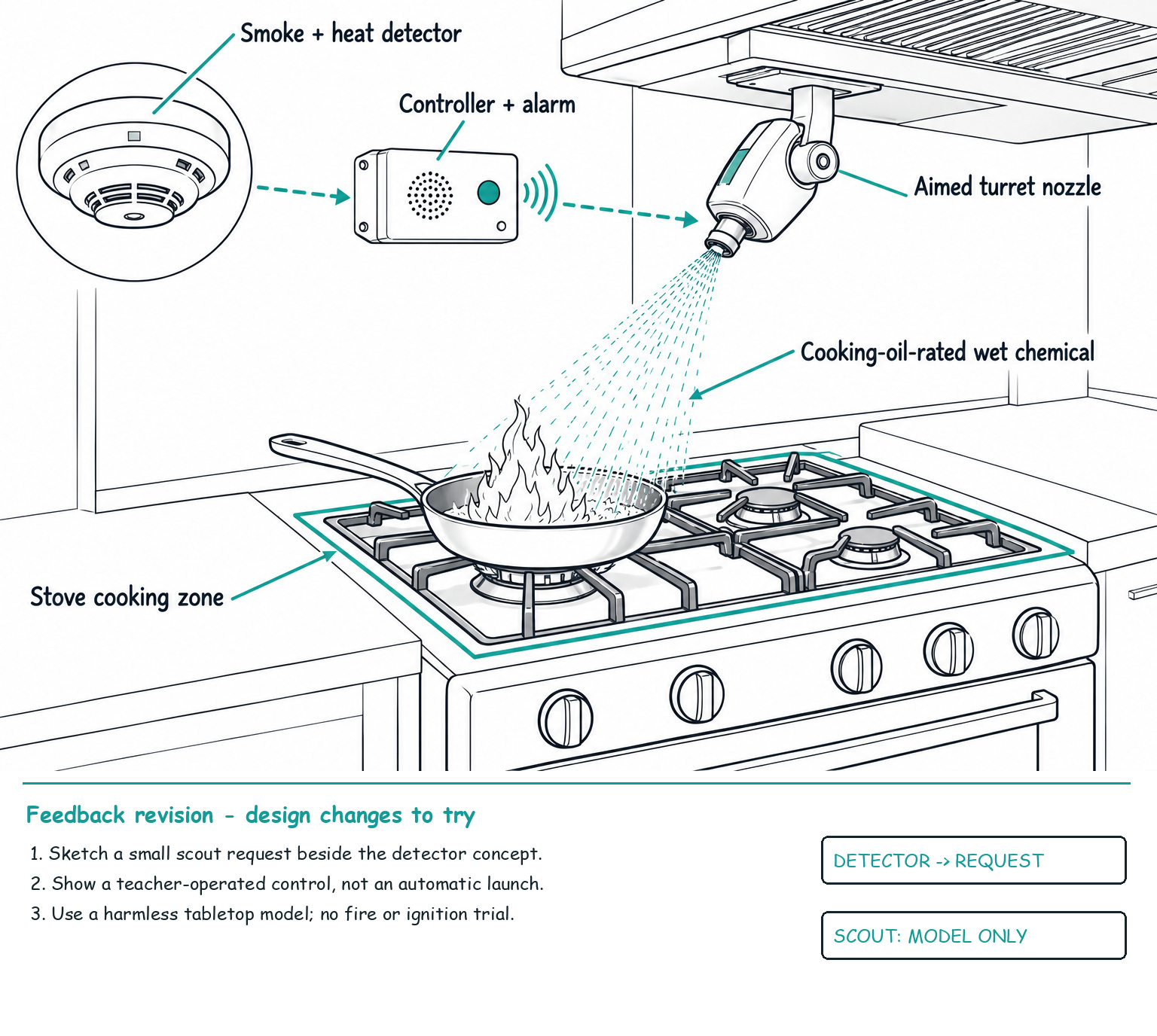
Who it could help: People cooking on a stove
The problem
A cooking fire needs a quick warning and a response aimed at the stove.
Why it matters
The system should treat the cooking area, rather than fill the whole room.
The idea
Smoke and heat sensors linked to an aimed stove nozzle using cooking-oil-rated wet chemical.
How it works
- Smoke and heat sensors alert the controller.
- The nozzle aims at the stove zone.
- Wet chemical is applied to that cooking area.
What to find out
A real kitchen needs a suitable system fitted by qualified fire-safety specialists.
Use a dry model. Ask a qualified fire-system specialist.
Feedback revision
- Sketch a small scout request beside the detector concept.
- Show a teacher-operated control, not an automatic launch.
- Use a harmless tabletop model; no fire or ignition trial.
Your activities
Improve the problem
Name a person, one difficult step and the evidence we need.
- Read the drone response and detection sections.
- Name who needs the information and where.
- Explain what the drone should help them see or learn.
Check: Name who needs help, what is difficult and what you still need to test.
Make the idea work
Show a useful change and explain how the parts connect.
- Draw the drone and the light.
- Label what it receives and what it sends back.
- Explain who controls it and how it stops.
Check: The drawing shows an input, movement or action, and a result. It distinguishes the printed structure from supplied equipment.
Test and explain
Compare fairly and explain what the result means.
- Compare a clear location message with a vague message in an indoor role-play.
- Use pretend messages and a paper plan indoors.
- Record which messages let the receiver identify the right place.
Check: The receiver identifies the intended place from the message. This checks communication only, not flight or fire response.
Group 7
Open Group 7 activities and answers
Idea 1: Which bin quiz
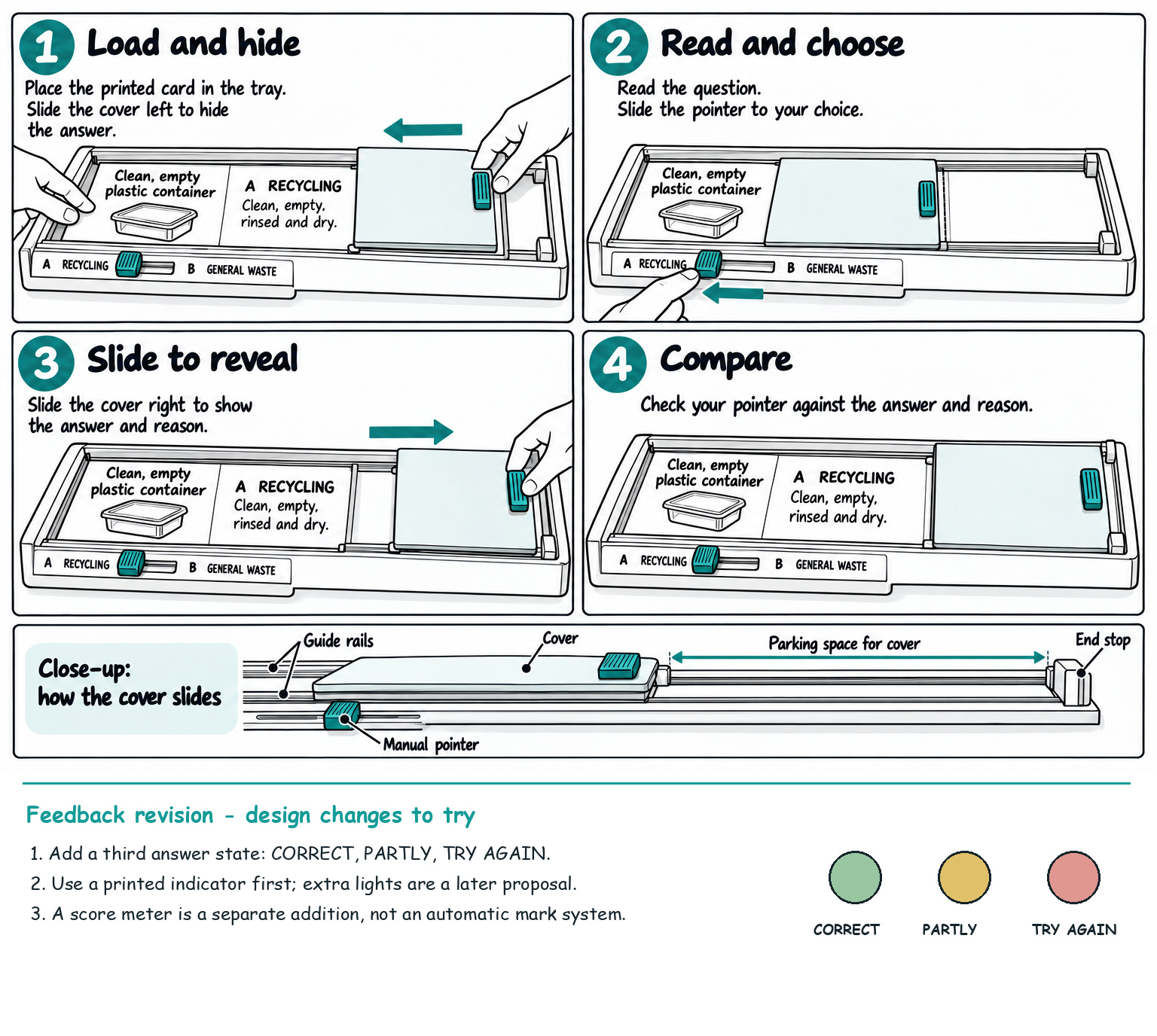
Who it could help: People learning to sort waste
The problem
People may be unsure whether an item belongs in recycling or general waste.
Why it matters
Showing the reason helps learners check their answer and use the rule again.
The idea
A manual quiz with one question-and-answer card, an A/B pointer and a sliding answer cover.
How it works
- Insert one card and hide the answer.
- Read the question. Choose A or B.
- Slide the cover right.
- Compare your choice with the printed answer.
What to find out
Does the card use the correct local recycling rules?
Ask someone new to set up, play and reset.
Feedback revision
- Add a third answer state: CORRECT, PARTLY, TRY AGAIN.
- Use a printed indicator first; extra lights are a later proposal.
- A score meter is a separate addition, not an automatic mark system.
Idea 2: Camera assisted bin feedback
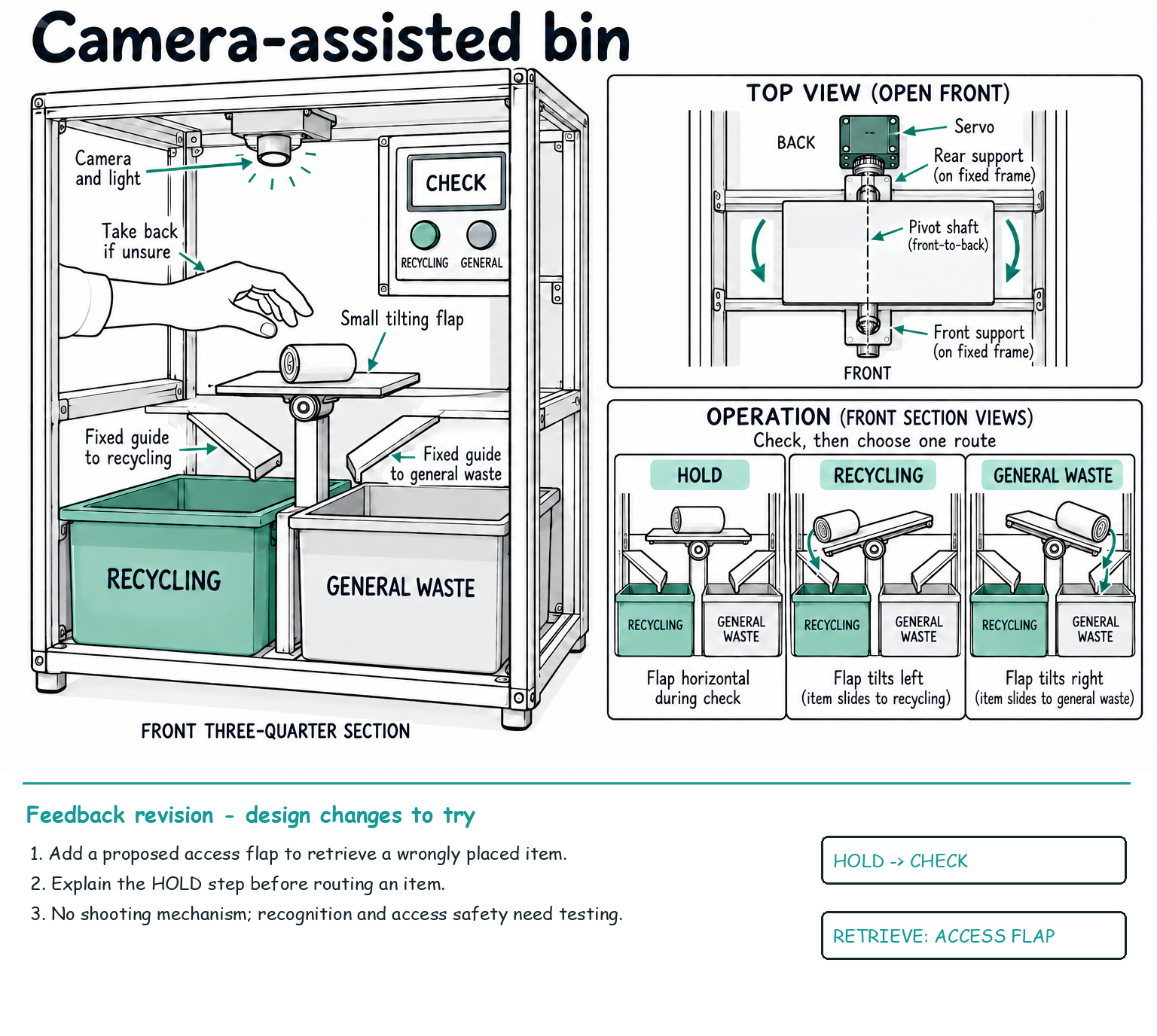
Who it could help: People using recycling and general-waste bins
The problem
Putting the wrong item in a recycling bin can spoil the recycling.
Why it matters
People need a way to take an item back when the system is unsure.
The idea
A camera check area with one small flap that tips towards recycling or general waste.
How it works
- Place one item on the flap.
- Check the result and confirm the route.
- The flap tips towards the chosen bin.
What to find out
Can someone take an unclear item back safely?
Test unknown items, moving gaps and jams with clean samples.
Feedback revision
- Add a proposed access flap to retrieve a wrongly placed item.
- Explain the HOLD step before routing an item.
- No shooting mechanism; recognition and access safety need testing.
Your activities
Improve the problem
Name a person, one difficult step and the evidence we need.
- Read the problem statement and the suggested wording.
- Ask which item or condition confuses people at the actual bin.
- Choose one difficult step. Complete your own improved statement.
Check: Name who needs help, what is difficult and what you still need to test.
Make the idea work
Show a useful change and explain how the parts connect.
- Show the same-item card and two condition positions.
- Use separate arrows for changing condition and revealing the reason.
- Mark where the sliders stop so they stay in their rails.
Check: The drawing shows an input, movement or action, and a result. It distinguishes the printed structure from supplied equipment.
Test and explain
Compare fairly and explain what the result means.
- Use this comparison: Ordinary recycling rule cards with the same information.
- After trying each method, use five new teacher-approved examples. Ask for the action and the reason, not only a score.
- Record what happened, or write the test plan if the equipment is not available. Explain one next change.
Check: The moving parts complete ten manual cycles without leaving their guides. Keep the extra mechanism only if it improves explanation or use compared with plain cards.
Group 8
Open Group 8 activities and answers
Idea 1: Reachable light control
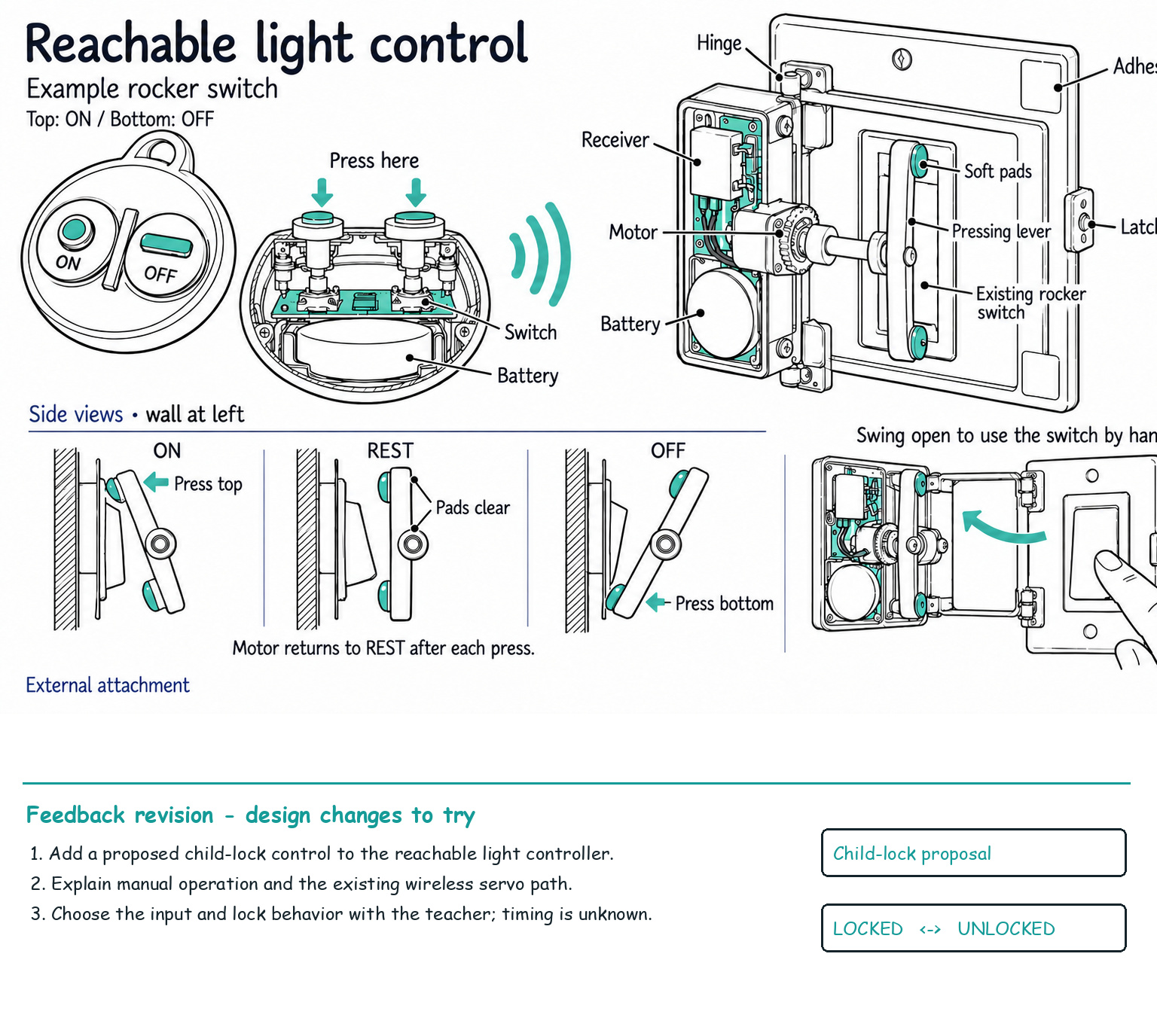
Who it could help: A person who cannot reach the light switch
The problem
A person in bed may be unable to reach the room light switch.
Why it matters
The person should be able to use the room's existing switch from bed.
The idea
A round remote that tells a battery-powered attachment to press the existing light switch.
How it works
- Press ON or OFF on the remote.
- The motor presses the matching rocker end.
- Swing open the mount to use the switch by hand.
What to find out
Does it fit this switch and allow normal hand use?
Test a model switch, pressing force, mount and hand access.
Feedback revision
- Add a proposed child-lock control to the reachable light controller.
- Explain manual operation and the existing wireless servo path.
- Choose the input and lock behavior with the teacher; timing is unknown.
Idea 2: Firestructor cooking guide
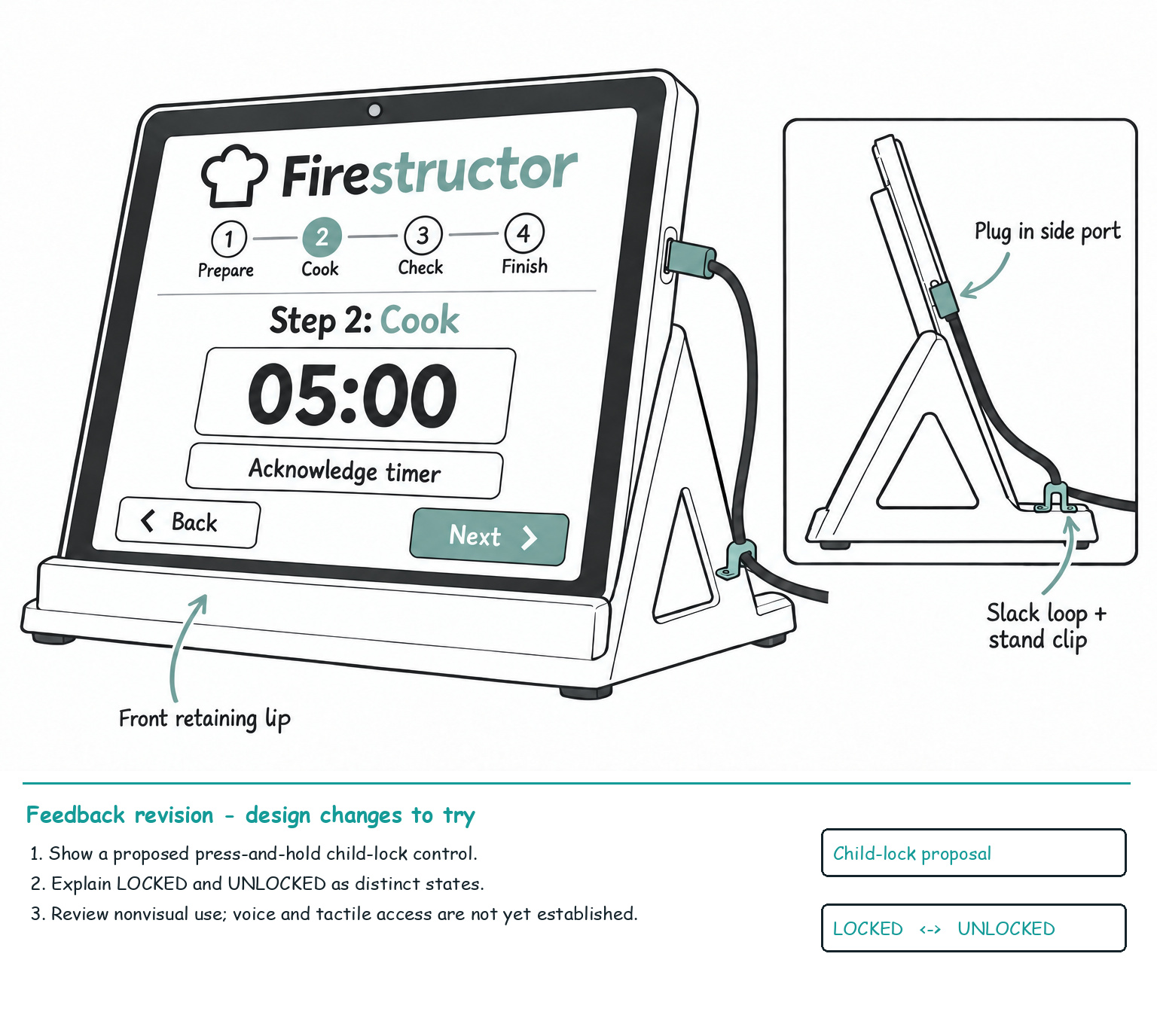
Who it could help: A cook following a recipe
The problem
A cook can lose their place in a recipe or leave food unattended.
Why it matters
Clear steps and reminders could help the cook return after an interruption.
The idea
A recipe screen with a timer and buttons to move between steps, held in a stand.
How it works
- Read the recipe step on the screen.
- Use the timer while you cook.
- Check the food before moving to the next step.
What to find out
Are the Check and Finish steps clear after an interruption?
Try the steps in a model kitchen with no heat.
Feedback revision
- Show a proposed press-and-hold child-lock control.
- Explain LOCKED and UNLOCKED as distinct states.
- Review nonvisual use; voice and tactile access are not yet established.
Your activities
Improve the problem
Name a person, one difficult step and the evidence we need.
- Read the problem statement and the suggested wording.
- Ask the intended user whether reaching, finding or pressing the present control is difficult.
- Choose one difficult step. Complete your own improved statement.
Check: Name who needs help, what is difficult and what you still need to test.
Make the idea work
Show a useful change and explain how the parts connect.
- Keep two controls side by side in a round case.
- Show each cap aligned with its switch.
- Draw the signal going to the matching lamp receiver.
Check: The drawing shows an input, movement or action, and a result. It distinguishes the printed structure from supplied equipment.
Test and explain
Compare fairly and explain what the result means.
- Use this comparison: The same compatible remote placed within comfortable reach.
- From a safe seated position, compare finding and pressing ON/OFF with the ordinary remote and the new case.
- Record what happened, or write the test plan if the equipment is not available. Explain one next change.
Check: Keep the case only if it reduces confusion or effort without creating accidental presses. Demonstrate both ON and OFF on the matched low-voltage lamp.
Group 9
Open Group 9 activities and answers
Idea 1: Phone sleep bed
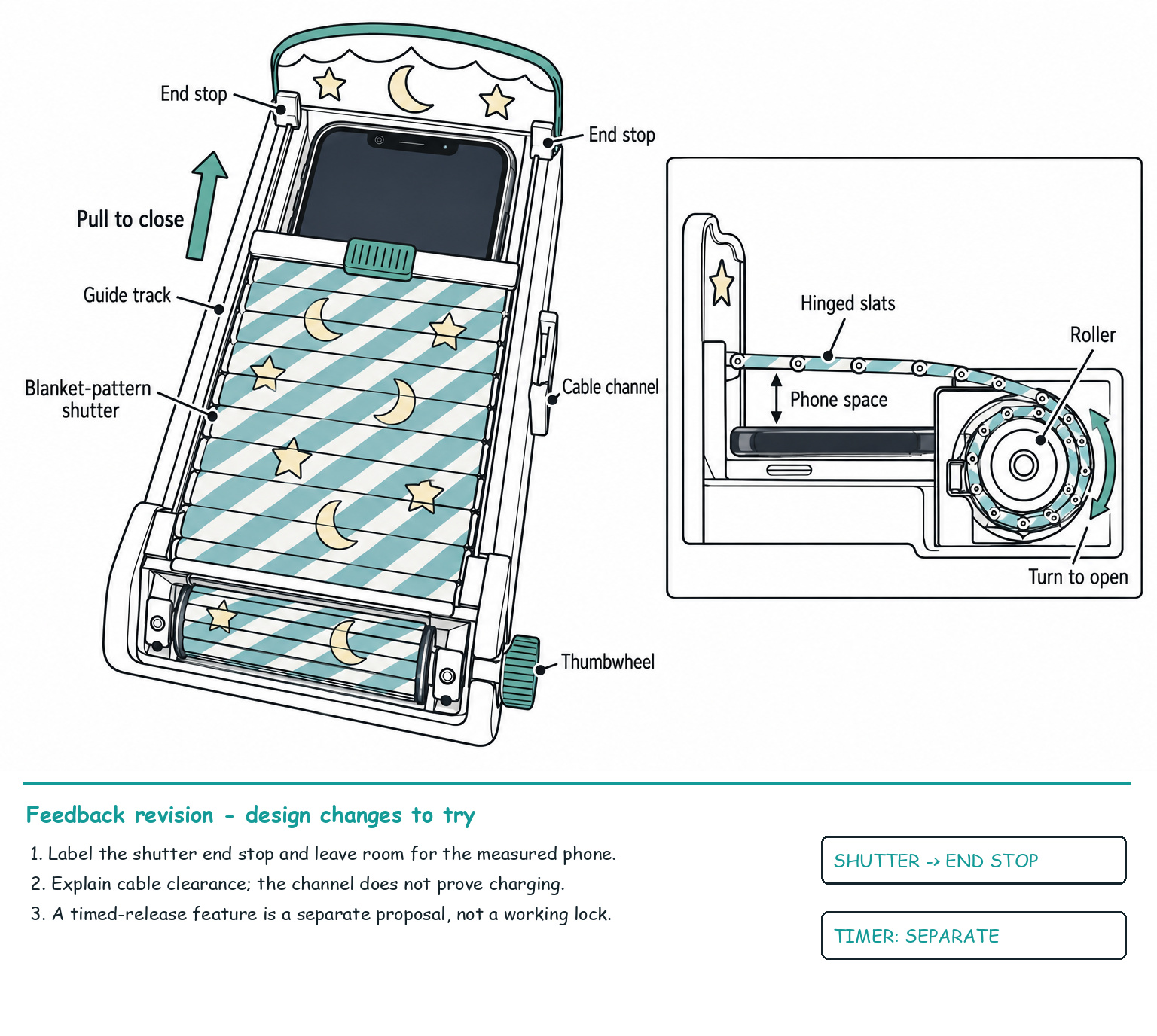
Who it could help: Someone taking a break from their phone
The problem
Someone taking a break from their phone wants a clear place to put it away.
Why it matters
The cover should move easily, and the phone should be easy to take out.
The idea
A phone bed with a blanket-patterned shutter that slides in side guides and rolls into the foot end.
How it works
- Pull the blanket-patterned cover along the guides.
- The linked slats close over the phone.
- Turn the roller to open the cover.
What to find out
Do the slats roll smoothly and leave space for the cable?
Check sliding, winding, jams and taking the phone out.
Feedback revision
- Label the shutter end stop and leave room for the measured phone.
- Explain cable clearance; the channel does not prove charging.
- A timed-release feature is a separate proposal, not a working lock.
Idea 2: Mystery sticker dispenser
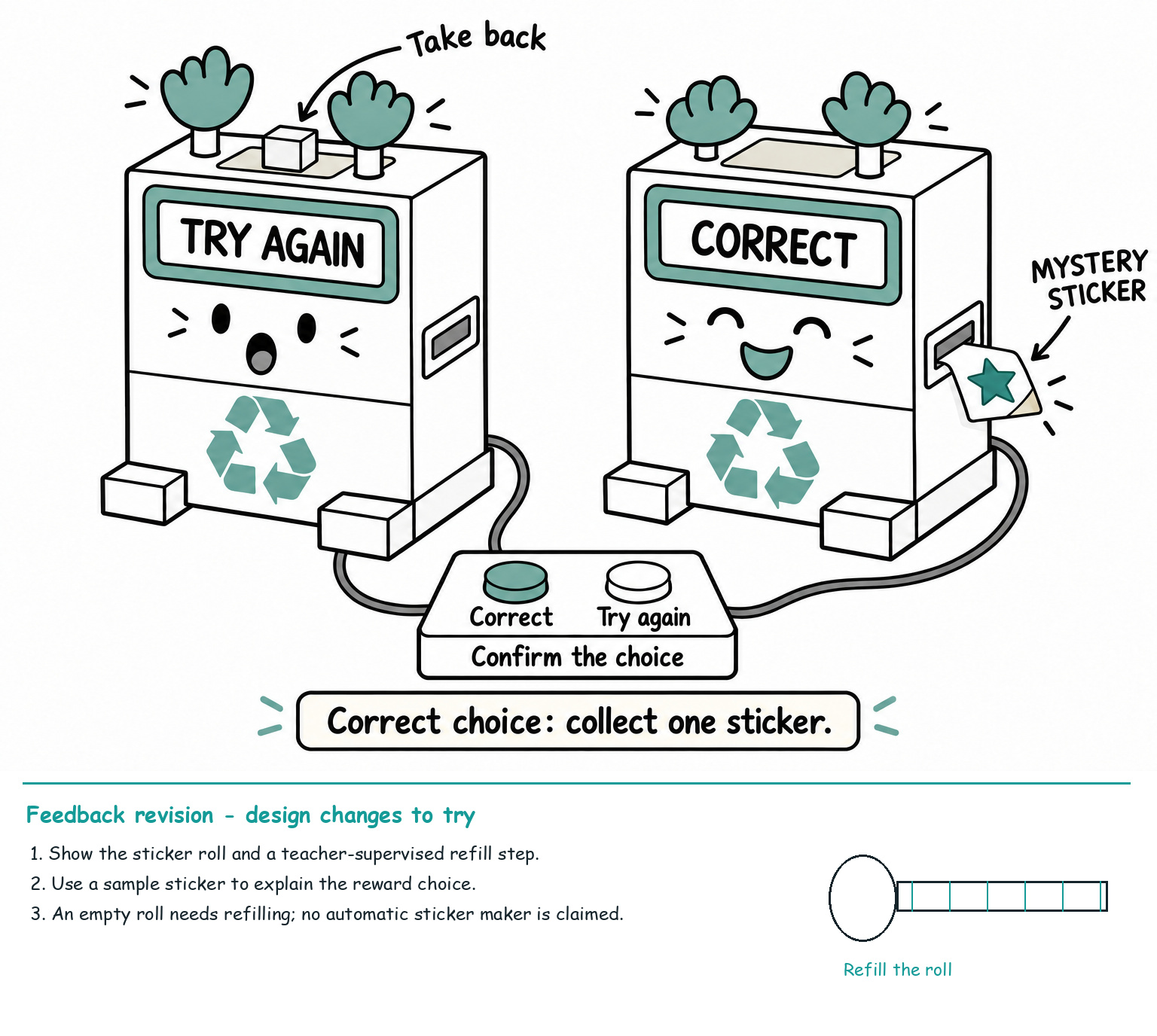
Who it could help: People learning what can be recycled
The problem
People may need clear feedback to learn what belongs in the recycling bin.
Why it matters
A mystery sticker rewards a correct sorting choice.
The idea
A box-shaped mascot with a slot that gives one mystery sticker after a correct sorting choice.
How it works
- A person confirms the sorting choice.
- CORRECT gives one mystery sticker.
- TRY AGAIN leaves the slot empty.
What to find out
Can people collect one sticker easily without seeing the next one?
Check sticker collection and the CORRECT and TRY AGAIN states.
Feedback revision
- Show the sticker roll and a teacher-supervised refill step.
- Use a sample sticker to explain the reward choice.
- An empty roll needs refilling; no automatic sticker maker is claimed.
Your activities
Improve the problem
Name a person, one difficult step and the evidence we need.
- Read the problem statement and the suggested wording.
- Ask why a person picks up the phone during the agreed break: a useful task, a notification, habit or another reason.
- Choose one difficult step. Complete your own improved statement.
Check: Name who needs help, what is difficult and what you still need to test.
Make the idea work
Show a useful change and explain how the parts connect.
- Measure a dummy phone and show how it enters the cradle.
- Draw the blanket motion and pull tab. Add your plan for an end stop.
- Keep the cable clear of moving rails.
Check: The drawing shows an input, movement or action, and a result. It distinguishes the printed structure from supplied equipment.
Test and explain
Compare fairly and explain what the result means.
- Use this comparison: An ordinary phone parking place during the same voluntary routine.
- Use a dummy first for five open/close cycles. For a voluntary behaviour comparison, count pickups and ask why each happens.
- Record what happened, or write the test plan if the equipment is not available. Explain one next change.
Check: The dummy fits and is retrieved in all five cycles without trapped cable. Keep the behaviour feature only if the real comparison shows a useful difference.
Group 10
Open Group 10 activities and answers
Idea 1: Living room caption TV
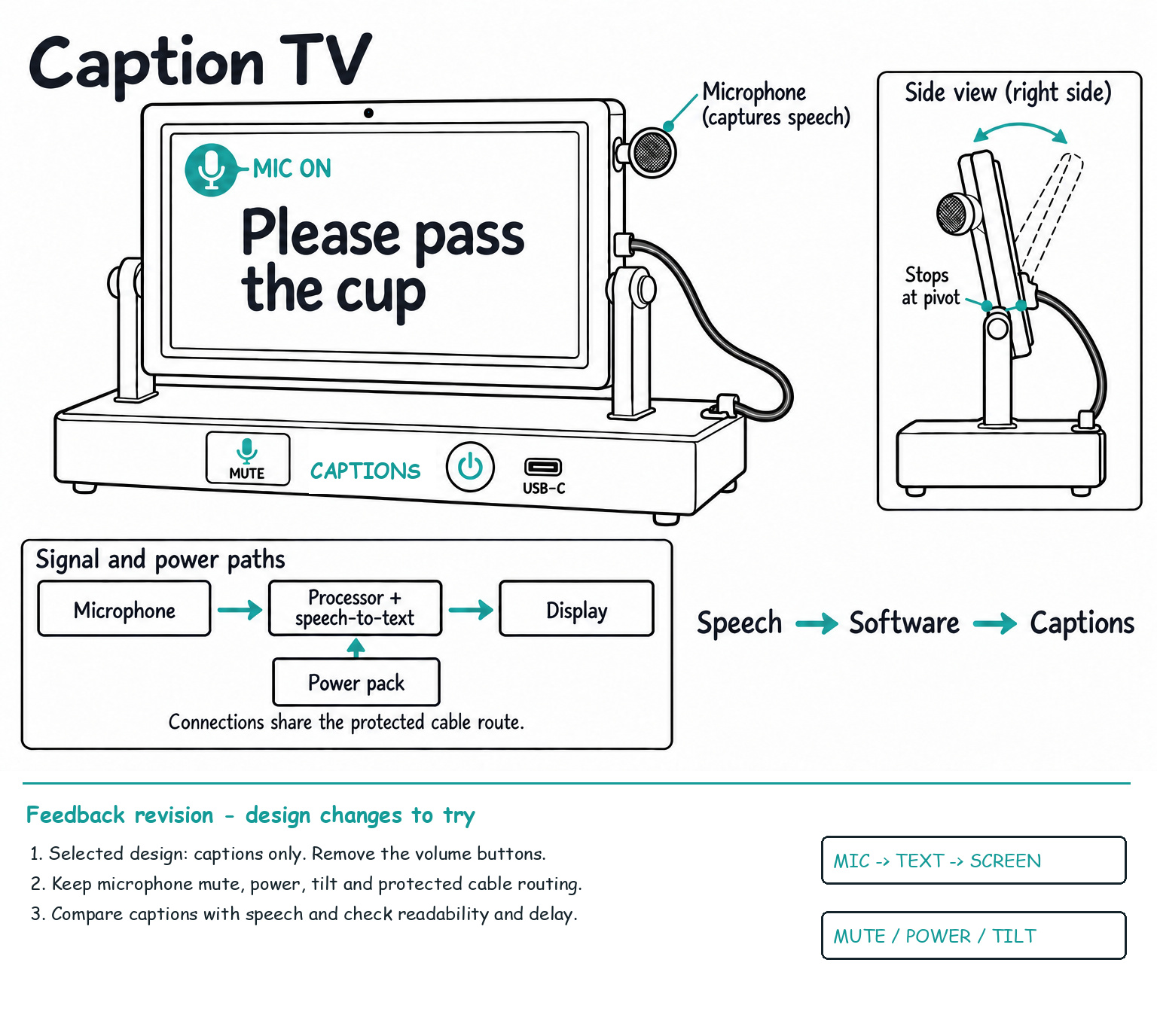
Who it could help: Someone who cannot hear speech clearly
The problem
A person who cannot hear clearly needs to read what is being said.
Why it matters
The words need to be easy to read and appear soon enough to follow the conversation.
The idea
A tabletop captions-only screen with microphone mute, tilt and power controls.
How it works
- The microphone picks up speech while MIC ON is shown.
- Speech-to-text software shows words on the screen.
- Mute pauses the microphone; power turns the unit off. Adjust the screen tilt for reading.
What to find out
Which computer and speech-to-text software work well together?
Compare short spoken sentences with the captions. Check readability, mistakes, delay, microphone mute and battery life with the teacher.
Feedback revision
- Selected design: captions only. Remove the volume buttons.
- Keep microphone mute, power, tilt and protected cable routing.
- Compare captions with speech and check readability and delay.
Idea 2: Fire response car
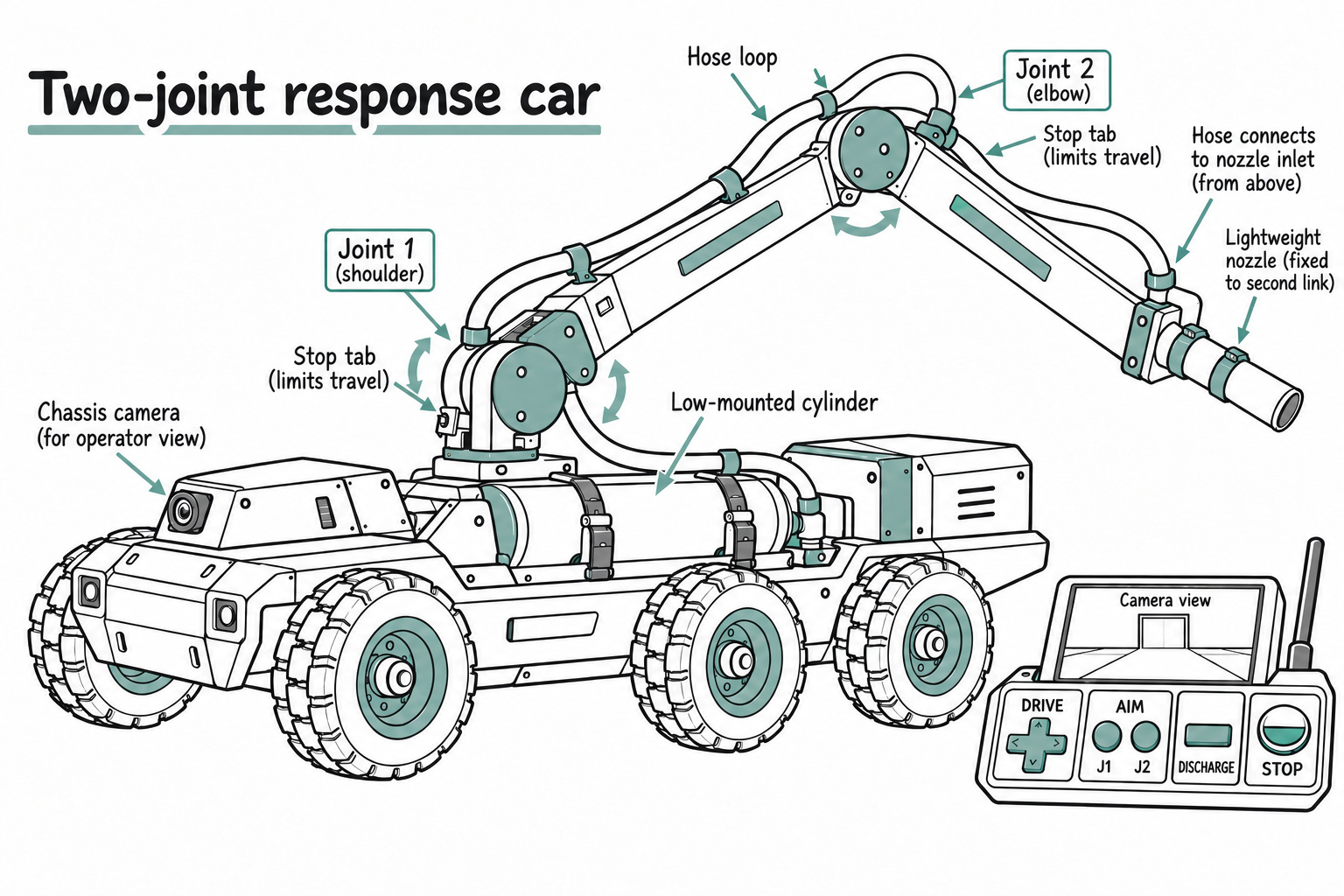
Who it could help: Fire responders
The problem
A responder needs to inspect and reach a dangerous area from a distance.
Why it matters
Keeping the heavy cylinder low could make the arm easier to move.
The idea
A wheeled vehicle with a low cylinder and a two-joint arm holding a nozzle.
How it works
- Drive using the camera view.
- Move the two joints to aim the nozzle.
- Use separate DISCHARGE and STOP controls.
What to find out
Can the model reach forward without tipping or pulling the hose?
Use a non-spraying model to check balance and hose movement.
Your activities
Improve the problem
Name a person, one difficult step and the evidence we need.
- Read the problem statement and the suggested wording.
- Ask a willing listener which situation and viewing position make speech or captions difficult to follow.
- Choose one difficult step. Complete your own improved statement.
Check: Name who needs help, what is difficult and what you still need to test.
Make the idea work
Show a useful change and explain how the parts connect.
- Trace speech to microphone, software, screen and reader.
- Show the hinge axis and two stable viewing positions.
- Keep the cable away from the moving hinge.
Check: The drawing shows an input, movement or action, and a result. It distinguishes the printed structure from supplied equipment.
Test and explain
Compare fairly and explain what the result means.
- Use this comparison: The same caption device in an ordinary position or stand.
- Use the same short phrases, reader position and lighting. Compare readability with two frame positions or with and without the shade.
- Record what happened, or write the test plan if the equipment is not available. Explain one next change.
Check: Keep the printed change only if readability or positioning improves without hiding text or obstructing controls. Record errors made by the app.
Explain your next step
Show who needs help, what you changed, what you kept the same in your comparison and what the result means. If you cannot test safely with the equipment available, explain the test plan instead of claiming a result.