Group 9: compare your two ideas
Choose one difficulty to help with. Compare both ideas, make one useful change and explain a fair test. The model examples show design proposals, not equipment proven to work.
Idea 1: Phone sleep bed
Who it could help: Someone taking a break from their phone
The problem
Someone taking a break from their phone wants a clear place to put it away.
Why it matters
The cover should move easily, and the phone should be easy to take out.
The idea
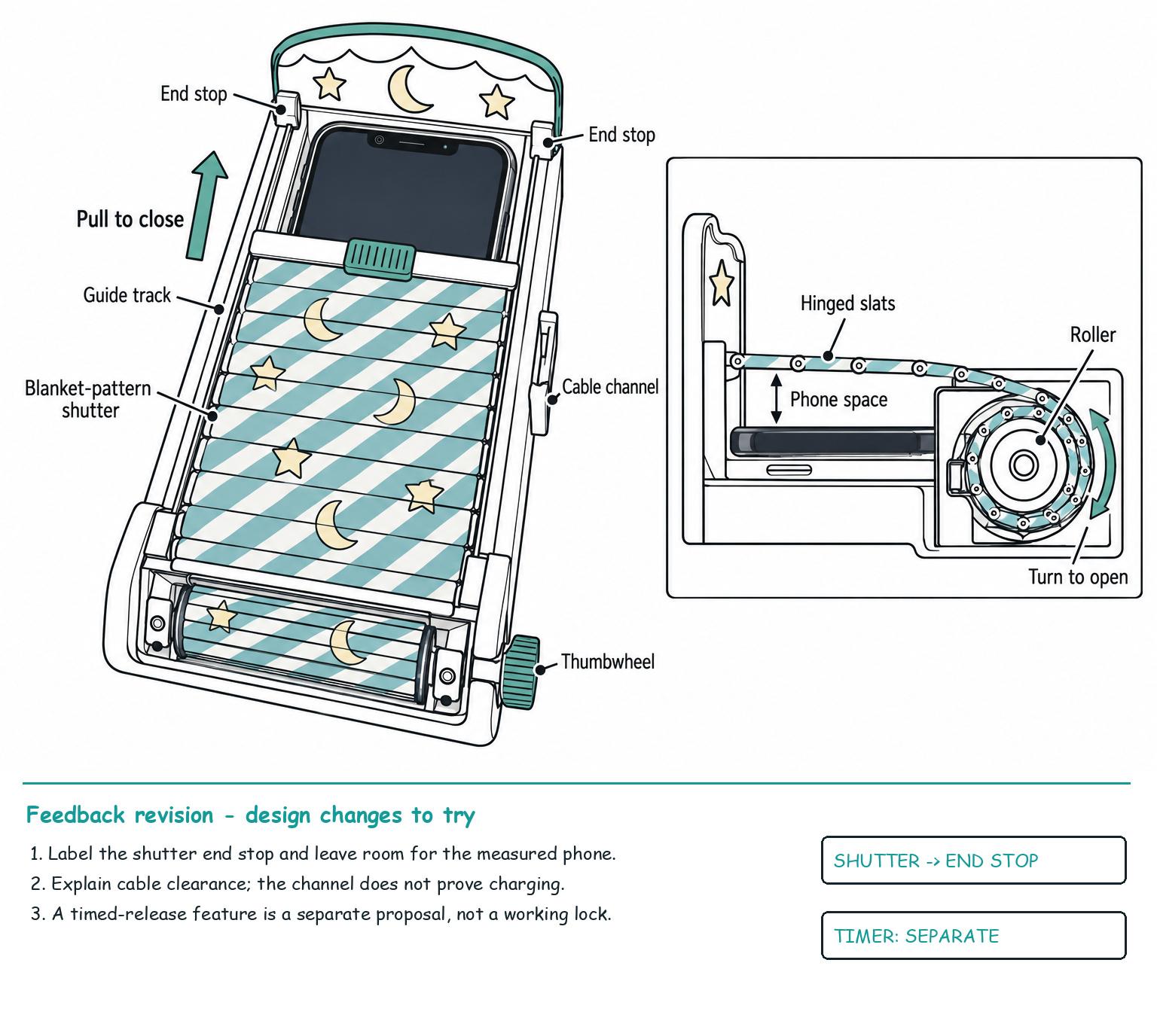
A phone bed with a blanket-patterned shutter that slides in side guides and rolls into the foot end.
How it works
- Pull the blanket-patterned cover along the guides.
- The linked slats close over the phone.
- Turn the roller to open the cover.
What to find out
Do the slats roll smoothly and leave space for the cable?
Check sliding, winding, jams and taking the phone out.
Feedback revision: changes to try
- Label the shutter end stop and leave room for the measured phone.
- Explain cable clearance; the channel does not prove charging.
- A timed-release feature is a separate proposal, not a working lock.
Earlier drawing is preserved
Compare the revision with the original before building.
Open the earlier illustration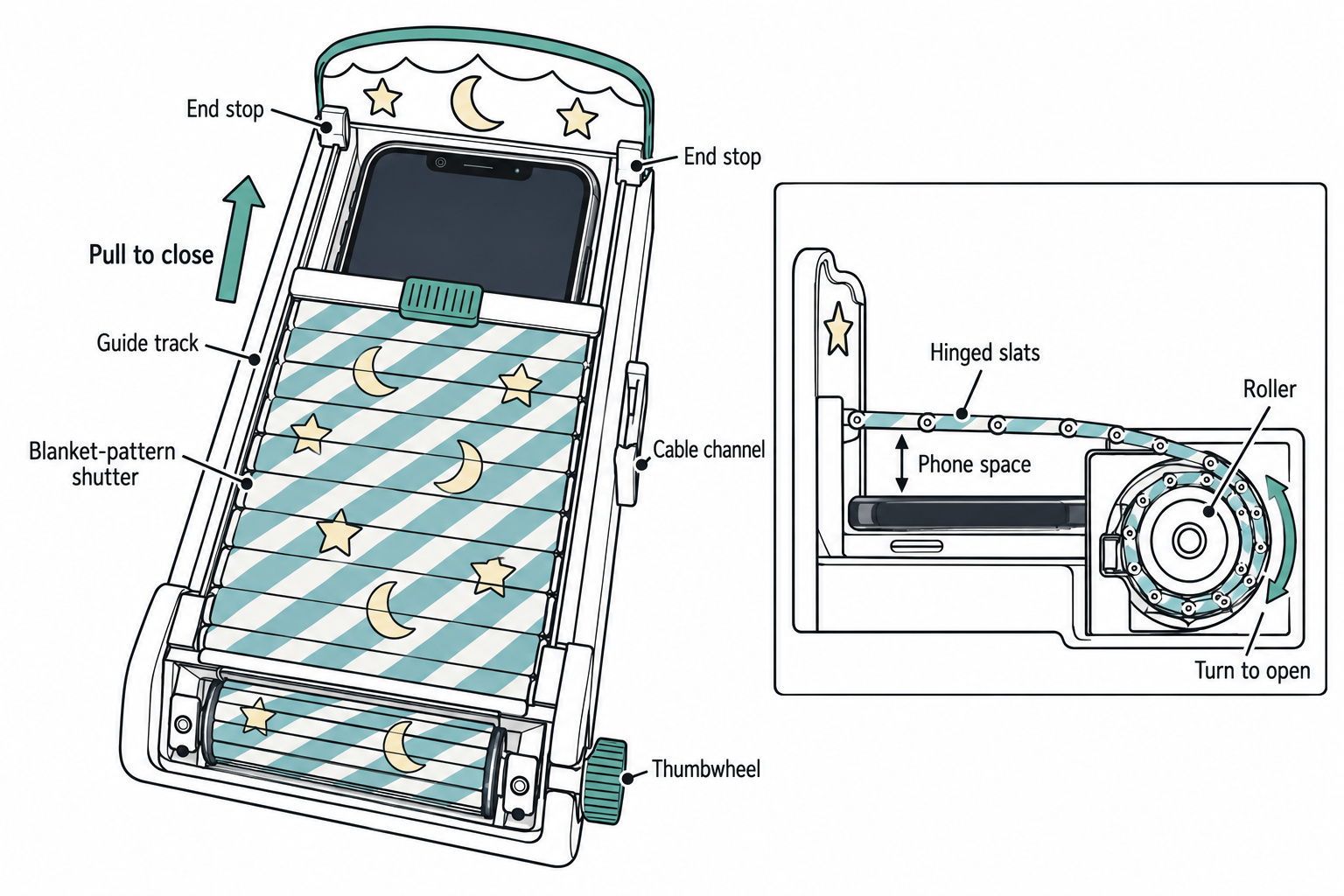
2D drawing and Tinkercad instructions
Read the current drawing, label one change, and keep the original. In your drawing workspace, use the illustration as a fixed reference and add editable marks over it. Save the draft, then submit the drawing separately from your written answers.
Build a 3D concept with your teacher
- Use a box and box hole for the phone bed with an uncut floor.
- Make the shutter, end stop and cable channel separate.
- Measure the phone first; keep a timer in a separate concept model.
Use your assigned Tinkercad workspace. Verify the group, idea and units before opening an existing project. Duplicate it before changing it. Measure supplied parts and ask your teacher to check fit before printing. These instructions do not edit or connect to Tinkercad.
The prompts below contain the public design description only. They are not sent anywhere by FIT. A teacher or adult conducts the ChatGPT conversation and reviews any generated drawing or instructions. Keep pupil details and private submissions out of the prompt.
2D drawing prompt
Tinkercad instructions prompt
Idea 2: Mystery sticker dispenser
Who it could help: People learning what can be recycled
The problem
People may need clear feedback to learn what belongs in the recycling bin.
Why it matters
A mystery sticker rewards a correct sorting choice.
The idea
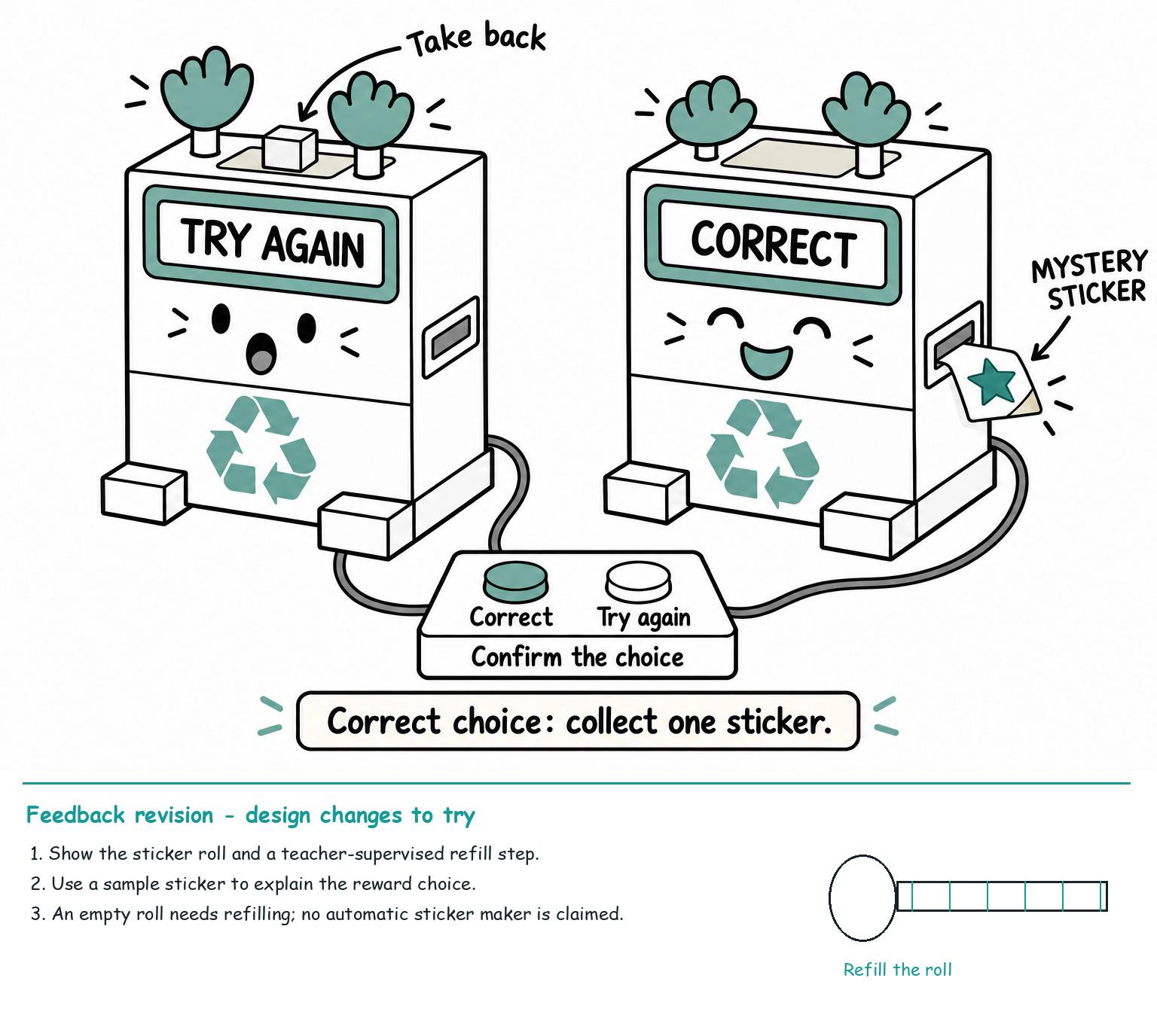
A box-shaped mascot with a slot that gives one mystery sticker after a correct sorting choice.
How it works
- A person confirms the sorting choice.
- CORRECT gives one mystery sticker.
- TRY AGAIN leaves the slot empty.
What to find out
Can people collect one sticker easily without seeing the next one?
Check sticker collection and the CORRECT and TRY AGAIN states.
Feedback revision: changes to try
- Show the sticker roll and a teacher-supervised refill step.
- Use a sample sticker to explain the reward choice.
- An empty roll needs refilling; no automatic sticker maker is claimed.
Earlier drawing is preserved
Compare the revision with the original before building.
Open the earlier illustration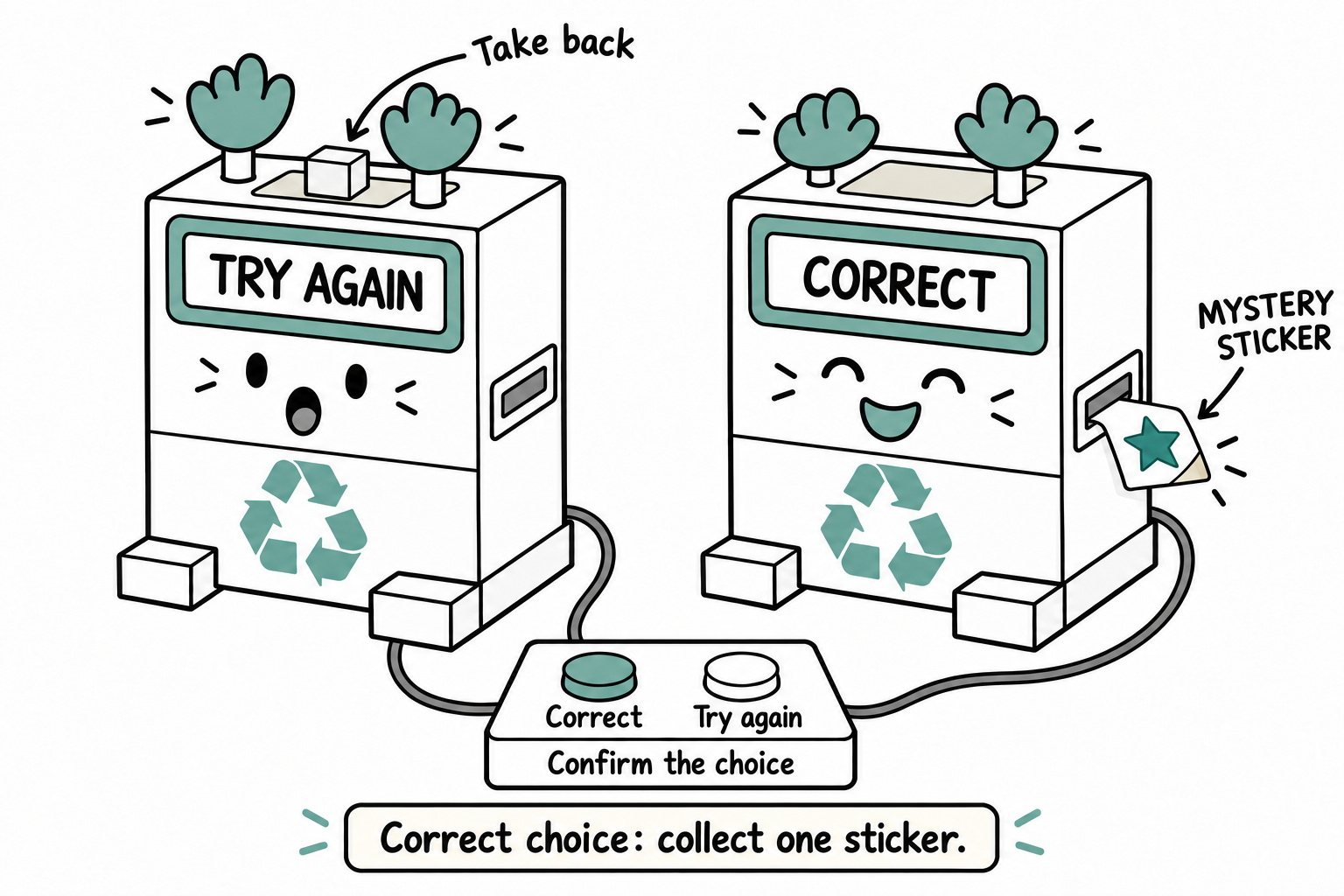
2D drawing and Tinkercad instructions
Read the current drawing, label one change, and keep the original. In your drawing workspace, use the illustration as a fixed reference and add editable marks over it. Save the draft, then submit the drawing separately from your written answers.
Build a 3D concept with your teacher
- Use a box for the dispenser and a cylinder for the roll.
- Add a slot and a separate refill lid with clearance.
- Show a sample sticker strip; label manual refilling.
Use your assigned Tinkercad workspace. Verify the group, idea and units before opening an existing project. Duplicate it before changing it. Measure supplied parts and ask your teacher to check fit before printing. These instructions do not edit or connect to Tinkercad.
The prompts below contain the public design description only. They are not sent anywhere by FIT. A teacher or adult conducts the ChatGPT conversation and reviews any generated drawing or instructions. Keep pupil details and private submissions out of the prompt.
2D drawing prompt
Tinkercad instructions prompt
Your three activities
Activity 1
Improve the problem
Name a person, one difficult step and the evidence we need.
- Read the problem statement and the suggested wording.
- Ask why a person picks up the phone during the agreed break: a useful task, a notification, habit or another reason.
- Choose one difficult step. Complete your own improved statement.
Check: Name who needs help, what is difficult and what you still need to test.
Activity 2
Make the idea work
Show a useful change and explain how the parts connect.
- Measure a dummy phone and show how it enters the cradle.
- Draw the blanket motion and pull tab. Add your plan for an end stop.
- Keep the cable clear of moving rails.
Check: The drawing shows an input, movement or action, and a result. It distinguishes the printed structure from supplied equipment.
Activity 3
Test and explain
Compare fairly and explain what the result means.
- Use this comparison: An ordinary phone parking place during the same voluntary routine.
- Use a dummy first for five open/close cycles. For a voluntary behaviour comparison, count pickups and ask why each happens.
- Record what happened, or write the test plan if the equipment is not available. Explain one next change.
Check: The dummy fits and is retrieved in all five cycles without trapped cable. Keep the behaviour feature only if the real comparison shows a useful difference.
Start your shape model
- Choose one reviewed idea and sketch its main parts.
- In Tinkercad, use boxes or cylinders for the structure. Set the sizes from measurements and label supplied equipment separately.
- Show one useful change, check how parts would connect and save a screenshot of your model for your teacher.
Use your teacher’s assigned workspace. Do not enter class joining details or account information in your answers. Ask your teacher before printing, powering or physically testing equipment.
Optional presentation preparation (saved only on this browser)
Your group’s answers
Use group numbers only. Do not enter names, emails, logins or private class links. Answers stay in this browser, on this device. They are not sent to FIT or a teacher. Download or print a copy to share with your teacher. On a shared device, clear this group after keeping your copy.
Group 9 answers
Chosen idea: Not chosen
- The person and place
- Not answered
- The difficult step
- Not answered
- What we know or need to find out
- Not answered
- Our improved problem statement
- Not answered
- One change we choose and why
- Not answered
- Printed parts and parts we need to supply
- Not answered
- What we compare and keep the same
- Not answered
- Our result or planned measurement
- Not answered
- Our next change and reason
- Not answered
- Our main message for the presentation
- Not answered
Loading your saved answers.