Group 6: compare your two ideas
Choose one difficulty to help with. Compare both ideas, make one useful change and explain a fair test. The model examples show design proposals, not equipment proven to work.
Idea 1: Fire inspection drone
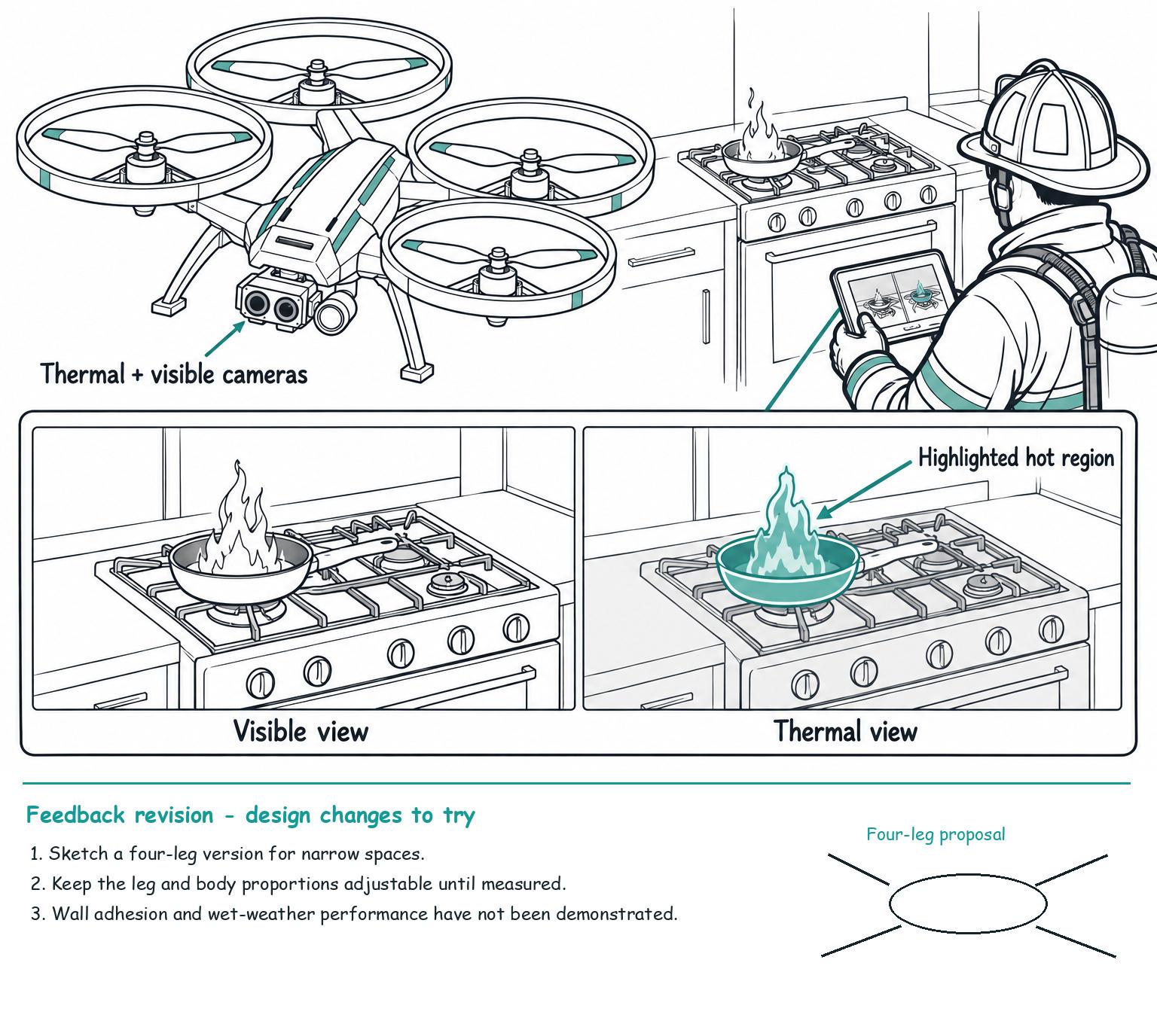
Who it could help: Firefighters
The problem
A response team needs to see what is happening in a place that is hard to reach.
Why it matters
Seeing heat beside a normal picture can help a firefighter find the hot area.
The idea
A drone with normal and thermal cameras that shows a visible fire and highlights its hot region.
How it works
- The drone sends normal and heat pictures.
- Compare both views of the visible fire.
- The highlight helps the firefighter spot the hot area.
What to find out
Do the normal and heat views show the same area?
Use safe pictures to compare heat views and camera errors.
Feedback revision: changes to try
- Sketch a four-leg version for narrow spaces.
- Keep the leg and body proportions adjustable until measured.
- Wall adhesion and wet-weather performance have not been demonstrated.
Earlier drawing is preserved
Compare the revision with the original before building.
Open the earlier illustration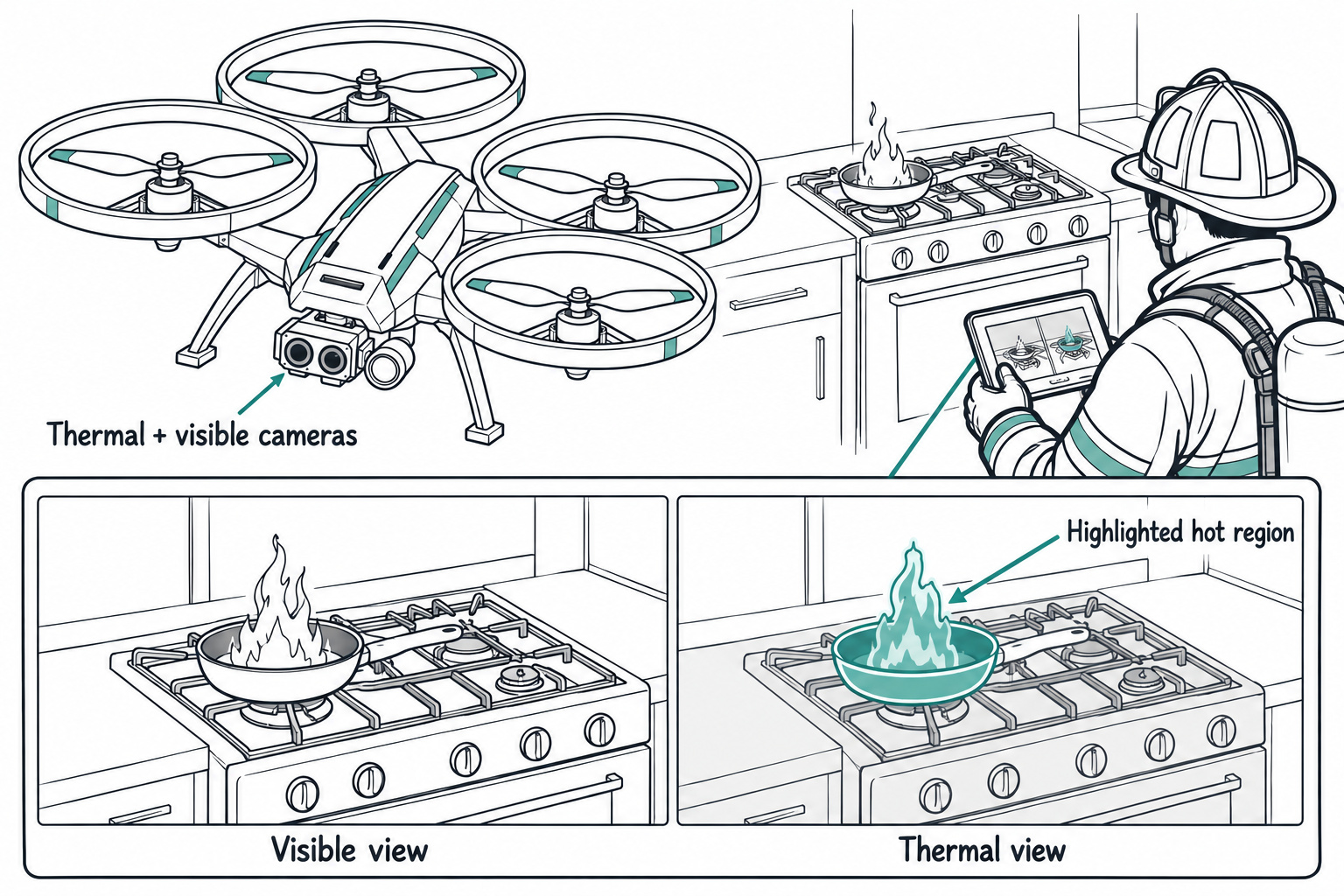
2D drawing and Tinkercad instructions
Read the current drawing, label one change, and keep the original. In your drawing workspace, use the illustration as a fixed reference and add editable marks over it. Save the draft, then submit the drawing separately from your written answers.
Build a 3D concept with your teacher
- Use a small rounded body and four separate leg shapes.
- Keep leg joints separate; check narrow-space clearance on a tabletop.
- Label adhesion equipment as unknown rather than claiming the model climbs.
Use your assigned Tinkercad workspace. Verify the group, idea and units before opening an existing project. Duplicate it before changing it. Measure supplied parts and ask your teacher to check fit before printing. These instructions do not edit or connect to Tinkercad.
The prompts below contain the public design description only. They are not sent anywhere by FIT. A teacher or adult conducts the ChatGPT conversation and reviews any generated drawing or instructions. Keep pupil details and private submissions out of the prompt.
2D drawing prompt
Tinkercad instructions prompt
Idea 2: Stove fire detector and nozzle
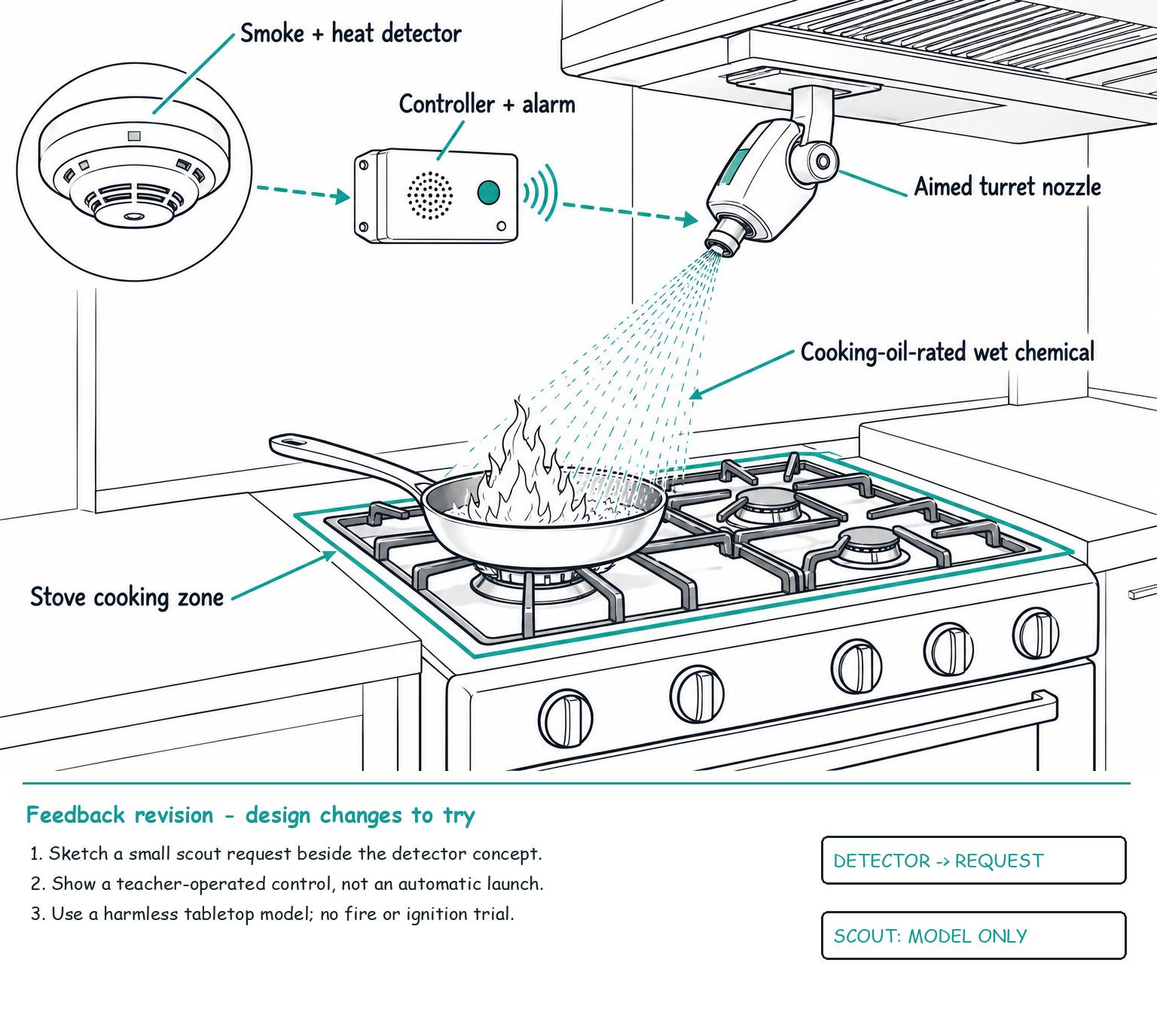
Who it could help: People cooking on a stove
The problem
A cooking fire needs a quick warning and a response aimed at the stove.
Why it matters
The system should treat the cooking area, rather than fill the whole room.
The idea
Smoke and heat sensors linked to an aimed stove nozzle using cooking-oil-rated wet chemical.
How it works
- Smoke and heat sensors alert the controller.
- The nozzle aims at the stove zone.
- Wet chemical is applied to that cooking area.
What to find out
A real kitchen needs a suitable system fitted by qualified fire-safety specialists.
Use a dry model. Ask a qualified fire-system specialist.
Feedback revision: changes to try
- Sketch a small scout request beside the detector concept.
- Show a teacher-operated control, not an automatic launch.
- Use a harmless tabletop model; no fire or ignition trial.
Earlier drawing is preserved
Compare the revision with the original before building.
Open the earlier illustration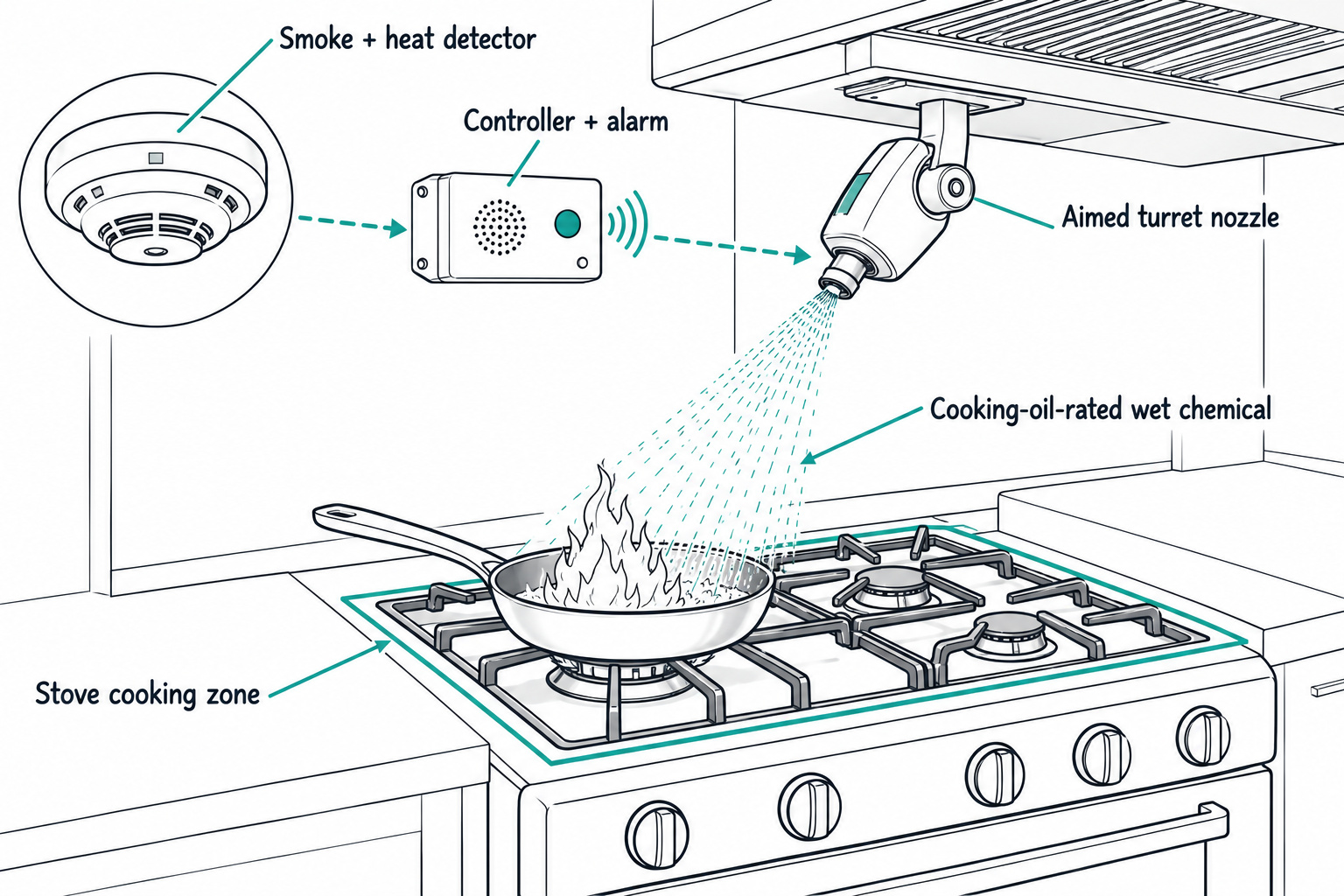
2D drawing and Tinkercad instructions
Read the current drawing, label one change, and keep the original. In your drawing workspace, use the illustration as a fixed reference and add editable marks over it. Save the draft, then submit the drawing separately from your written answers.
Build a 3D concept with your teacher
- Block out the detector and a separate small scout model.
- Label an operator control and an inactive request path.
- Check tabletop size and stability only; do not add a launch mechanism.
Use your assigned Tinkercad workspace. Verify the group, idea and units before opening an existing project. Duplicate it before changing it. Measure supplied parts and ask your teacher to check fit before printing. These instructions do not edit or connect to Tinkercad.
The prompts below contain the public design description only. They are not sent anywhere by FIT. A teacher or adult conducts the ChatGPT conversation and reviews any generated drawing or instructions. Keep pupil details and private submissions out of the prompt.
2D drawing prompt
Tinkercad instructions prompt
Your three activities
Activity 1
Improve the problem
Name a person, one difficult step and the evidence we need.
- Read the drone response and detection sections.
- Name who needs the information and where.
- Explain what the drone should help them see or learn.
Check: Name who needs help, what is difficult and what you still need to test.
Activity 2
Make the idea work
Show a useful change and explain how the parts connect.
- Draw the drone and the light.
- Label what it receives and what it sends back.
- Explain who controls it and how it stops.
Check: The drawing shows an input, movement or action, and a result. It distinguishes the printed structure from supplied equipment.
Activity 3
Test and explain
Compare fairly and explain what the result means.
- Compare a clear location message with a vague message in an indoor role-play.
- Use pretend messages and a paper plan indoors.
- Record which messages let the receiver identify the right place.
Check: The receiver identifies the intended place from the message. This checks communication only, not flight or fire response.
Start your shape model
- Choose one reviewed idea and sketch its main parts.
- In Tinkercad, use boxes or cylinders for the structure. Set the sizes from measurements and label supplied equipment separately.
- Show one useful change, check how parts would connect and save a screenshot of your model for your teacher.
Use your teacher’s assigned workspace. Do not enter class joining details or account information in your answers. Ask your teacher before printing, powering or physically testing equipment.
Optional presentation preparation (saved only on this browser)
Your group’s answers
Use group numbers only. Do not enter names, emails, logins or private class links. Answers stay in this browser, on this device. They are not sent to FIT or a teacher. Download or print a copy to share with your teacher. On a shared device, clear this group after keeping your copy.
Group 6 answers
Chosen idea: Not chosen
- The person and place
- Not answered
- The difficult step
- Not answered
- What we know or need to find out
- Not answered
- Our improved problem statement
- Not answered
- One change we choose and why
- Not answered
- Printed parts and parts we need to supply
- Not answered
- What we compare and keep the same
- Not answered
- Our result or planned measurement
- Not answered
- Our next change and reason
- Not answered
- Our main message for the presentation
- Not answered
Loading your saved answers.