What the DHT11 is doing on its single data line, how a bit is encoded in a pulse width, how the 40-bit frame is checksummed, and what plus or minus 2 degrees C means for a project.
Sensor reference
Inside the DHT11: protocol, frame and accuracy
What the DHT11 is doing on its single data line, how a bit is encoded in a pulse width, how the 40-bit frame is checksummed, and what plus or minus 2 degrees C means for a project. Read it after you have had the sensor running, not before.
You are hereInside the DHT11The single-wire protocol, the 40-bit frame, and what the accuracy figure means.
Technical details
The DHT11 single-wire protocol
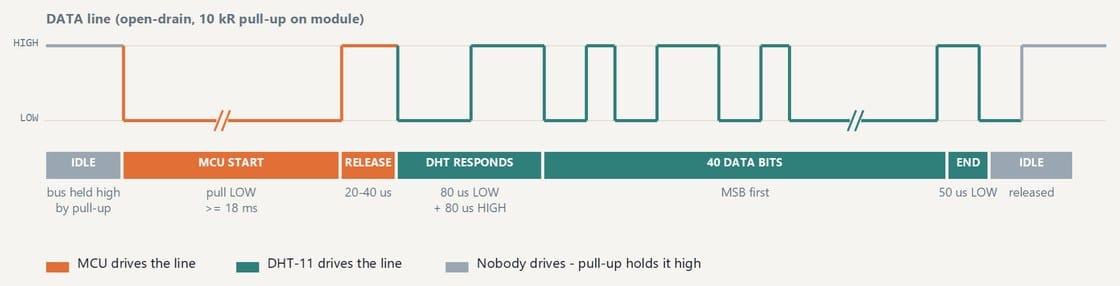
One wire, both directions, held high by a 10 kilohm pull-up on the module whenever nobody is driving it.
Fix It Today workshop figure, from Reading the Air (Workshop 2, NTU MSE MIC 2026).
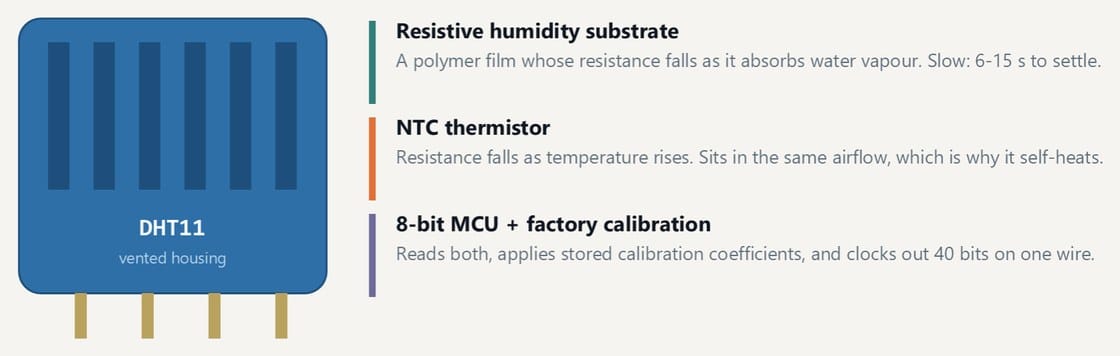
What is inside the module
A resistive humidity element, a thermistor, and a small microcontroller that rounds both to whole numbers before you ever see them. The 1 percent and 1 degree steps in your serial output are the sensor's own resolution, not a rounding choice in your sketch.
Fix It Today workshop figure, from Reading the Air (Workshop 2, NTU MSE MIC 2026).
One transaction on the data line
The Nano pulls the line low for at least 18 ms to ask, releases it, and the DHT11 answers with 80 us low and 80 us high before sending 40 bits. One wire, both directions, held high by a 10 kilohm pull-up on the module when nobody is driving it.
Fix It Today workshop figure, from Reading the Air (Workshop 2, NTU MSE MIC 2026).
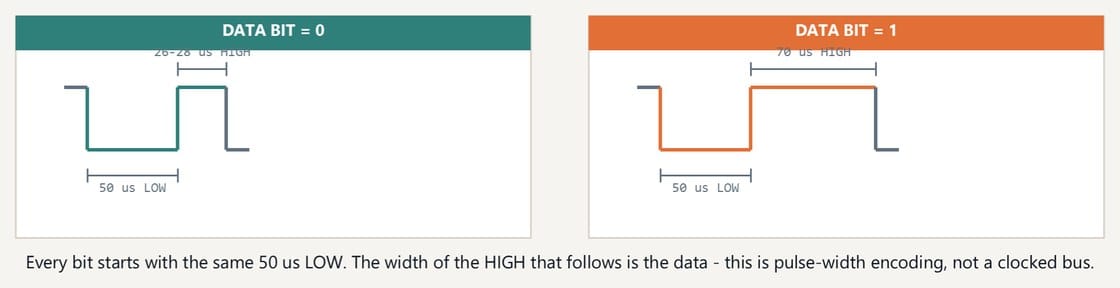
How a bit is encoded
Every bit starts with the same 50 us low. What follows decides the value: about 26 to 28 us high is a zero, about 70 us is a one. The data is in the pulse width, which is why the library has to disable interrupts while it reads.
Fix It Today workshop figure, from Reading the Air (Workshop 2, NTU MSE MIC 2026).
The 40-bit frame and its checksum
Five bytes: humidity integer, humidity decimal, temperature integer, temperature decimal, checksum. The checksum is the low byte of the first four added together. Fail it and the library hands you NaN rather than a wrong number.
How a library actually reads this
The data is in the pulse width, not in a clock. About 26 to 28 microseconds high is a zero; about 70 is a one.
The DHT11 library used in the workshop samples the line 30 microseconds after each falling edge: still high means a one, already low means a zero. It busy-waits on the pin rather than using interrupts.
The read blocks. It waits out the configured delay, holds the line low for 18 ms, then clocks in 40 bits, and nothing else in your sketch runs during any of that.
The checksum is verified before anything is returned. A mismatch gives you error 254 rather than a plausible wrong number, which is why every sketch tests the return value.
Technical details
DHT11 specifications, from the datasheet
SpecificationValue
Humidity range20 to 90 percent RH
Humidity accuracyplus or minus 5 percent RH
Temperature range0 to 50 degrees C
Temperature accuracyplus or minus 2 degrees C
Resolution1 percent RH, 1 degree C
Maximum sample rateonce every 2 seconds
Supply3.3 to 5.5 V
Interfacesingle-wire, custom protocol
What the accuracy figure means
Plus or minus 2 degrees C rules the DHT11 out of anything that needs a real temperature. It's fine for a demonstration, a trend, or a threshold you set by experiment.
Resolution and accuracy are different things. The DHT11 reports whole numbers and can still be 2 degrees out.
Averaging cuts random noise. It does nothing about a fixed offset, which is what most of that 2 degrees is.
Once every 2 seconds is the maximum sample rate. The library defaults to 500 ms, which is faster than the datasheet allows, so call dht11.setDelay(2000) rather than leaving the default.
Technical details
Four ways to get bad data from a working sensor
Self-heating and nearby heatMount the sensor away from the regulator, a motor driver or anything else warm. A DHT11 sitting on top of a powered board reads its own waste heat.
No airflowInside a sealed enclosure you are measuring the enclosure, not the room. Humidity in particular takes minutes to equalise through a small gap.
Polling too fastFaster than 0.5 Hz and you are reading a cache. The number stops moving and looks like a hardware fault.
Trusting one readingTake several, look at the spread, and set your thresholds from what you actually observed in the room rather than from the datasheet range.
Technical details
Dew point from temperature and humidity
Dew point is the temperature the air would have to reach for the water in it to condense. It's a more useful comfort number than humidity on its own, and it costs one function.
dewPointC.inoArduino C++
1// Magnus-Tetens, Sonntag 1990 coefficients.
2// Valid roughly -45 to +60 C. Good to about 0.35 C.
The DHT11 library returns ints; they promote to float on the way in. Add this to the reading sketch and print dewPointC(temperature, humidity) alongside the raw values. The library has no dew point or heat index function of its own.
Reference
The complete humidity alarm sketch
The full version of build step 4, in three parts because it reads better that way. Paste all three into one file, in this order, and add dewPointC from above.
humidity_alarm.ino (1 of 3, setup and pin definitions)Arduino C++
humidity_alarm.ino (3 of 3, optional smoothing)Arduino C++
1// A rolling mean over five readings. Averaging removes random scatter;
2// it does nothing about the fixed offset, which is most of the +/- 2 C.
3const uint8_t N = 5;
4int ring[N];
5uint8_t count = 0, next = 0;
6
7float smoothed(int value) {
8 ring[next] = value;
9 next = (next + 1) % N;
10 if (count < N) count++;
11
12 long total = 0;
13 for (uint8_t i = 0; i < count; i++) total += ring[i];
14 return total / (float) count;
15}
Without dewPointC from further up this page, this will not compile.
S3_read_the_air.ino (the plain reading sketch, for reference)Arduino C++
1#include <DHT11.h>
2
3DHT11 dht11(4); // KY-015 signal -> D4
4
5void setup() {
6 Serial.begin(9600);
7 dht11.setDelay(2000); // datasheet: 1 reading every 2 s
8 Serial.println("temp_C, humidity_pct");
9}
10
11void loop() {
12 int temperature = 0;
13 int humidity = 0;
14 int result = dht11.readTemperatureHumidity(temperature, humidity);
15
16 if (result == 0) {
17 Serial.print(temperature);
18 Serial.print(", ");
19 Serial.println(humidity);
20 } else {
21 Serial.println(DHT11::getErrorString(result));
22 }
23}
Alternatives
Sensors to use when the DHT11 is not accurate enough
DHT22 / AM2302Same single-wire protocol and the same library. Plus or minus 0.5 degrees C and 2 percent RH, 0.1 degree resolution, and a wider range. Costs a few dollars more and samples at 0.5 Hz.
SHT31 or SHT41I2C, plus or minus 0.2 to 0.3 degrees C, properly calibrated. This is the one to reach for if a measurement has to stand up.
BME280I2C or SPI, and gives pressure as well as temperature and humidity. Useful when altitude or weather matters.
DS18B20Temperature only, plus or minus 0.5 degrees C, and available in a waterproof probe. The right answer when you need to measure a liquid or a surface.
The Nano, shield and KY-015 pictures are the supplier and manufacturer photos of the hardware in the kit. The other photographs are Creative Commons images from Wikimedia Commons, reused under their own licences. Diagrams in the orange-and-teal house style are our own workshop figures. The kit wiring diagrams come from Keyestudio and the pinout sheet from Arduino.
USB-C Nano board photoKit supplier product photo, labels by Fix It Today, the board supplied in the kit
Nano I/O expansion shield, top viewVoltaat, supplier product photo of the kit shieldSource file
Arduino workshop benchDvlsUACh, CC BY-SA 4.0Source file
Survey and feedback
Help improve MakerAccess
Have an idea for what MakerAccess should stock, improve, or explain next? Share it in the survey. If you bought or used a product and want to comment on the item itself, use the product feedback form.